How to Update Windows 10 in 2026: Windows Update & ESU Guide
You can still open and use Windows Update in Windows 10, but updating Windows 10 in 2026 is different from updating it before Microsoft ended normal support.
Standard support for Windows 10 Home and Pro ended on 14 October 2025. A normal Windows 10 PC therefore no longer receives the free Windows security and software updates that were supplied during the standard support period.
Important: Windows 10 version 22H2 is the final Windows 10 release. Microsoft is not releasing another normal Windows 10 feature version.
Eligible Windows 10 version 22H2 personal PCs can enrol in Microsoft's Consumer Extended Security Updates (ESU) programme to continue receiving critical and important security updates through 12 October 2027.
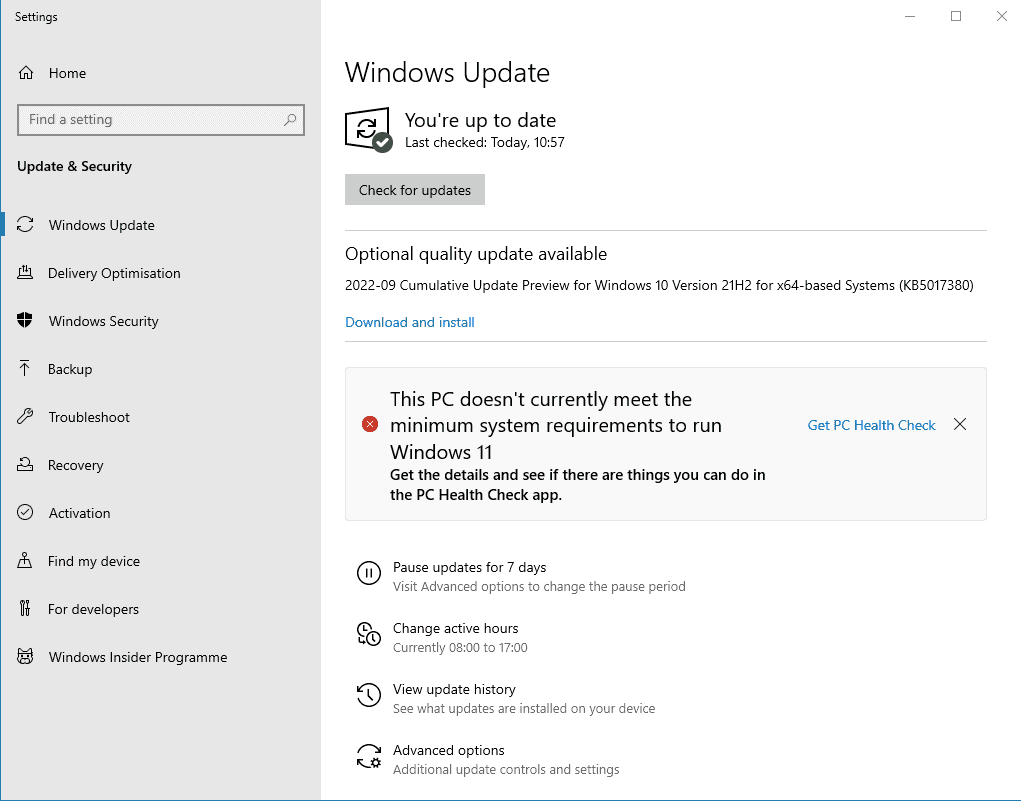
Quick answer: Open Start → Settings → Update & Security → Windows Update → Check for updates. Install anything Windows Update legitimately offers and restart if requested. If your PC is not enrolled in ESU, do not expect normal Windows 10 security updates after October 2025. Windows Update may also show whether your PC can upgrade to Windows 11.
How to Check for Windows 10 Updates
The Windows Update route itself remains straightforward.
- Open Start.
- Select Settings.
- Select Update & Security.
- Select Windows Update.
- Select Check for updates.
Windows will then contact Microsoft's update service and check what is currently available for that computer.
If an update is offered, Windows may display:
Download and install
or begin downloading an applicable update automatically.
Save your work before installing updates. Some updates require Windows to restart before installation can finish.
An alternative way to open Windows Update
You can also:
- Select the Windows search box.
- Type Windows Update.
- Select Windows Update settings.
This opens the same Windows Update area.
What Happens When You Check for Updates in 2026?
This depends on the computer.
Not enrolled in ESU
Normal Windows 10 support has ended, so Microsoft no longer provides the normal free Windows 10 software and security updates supplied before October 2025.
Extended security updates
An eligible Windows 10 22H2 PC enrolled in ESU can continue receiving Microsoft's applicable critical and important security updates.
Upgrade may be offered
Windows Update can also indicate that the PC is eligible to upgrade to Windows 11.
Seeing “You're up to date” does not mean an ordinary Windows 10 installation is still within normal Microsoft support. It only means Windows Update has no further applicable update to install at that moment.
Check That You Have Windows 10 Version 22H2
If the PC must remain on Windows 10, check which release is installed.
Use winver
- Press Windows key + R.
- Type winver.
- Press Enter.
The Windows information window will display the version.
The final normal Windows 10 release is:
Version 22H2
Older releases include:
- 21H2.
- 21H1.
- 20H2.
- 2004.
- 1909.
- Earlier Windows 10 versions.
Those releases reached end of support before Windows 10 22H2.
Updating an old Windows 10 installation to 22H2 does not return the computer to normal support. Windows 10 22H2 itself reached standard end of support on 14 October 2025.
Check through Settings
You can also open:
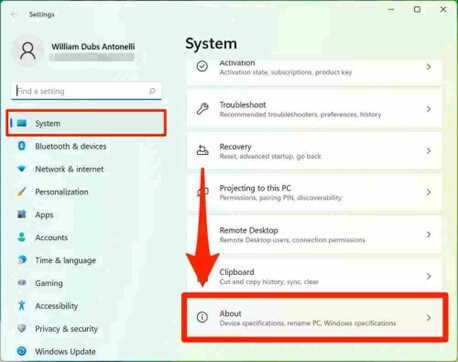
Settings → System → About
Under Windows specifications, check:
- Edition.
- Version.
- OS build.
What Types of Windows 10 Updates Used to Be Available?
During normal Windows 10 support, Windows Update supplied several types of updates.
Security updates
Updates designed to correct vulnerabilities discovered in Windows.
Quality updates
Fixes for reliability, bugs and operating-system behaviour.
Feature updates
Larger releases that introduced a newer Windows 10 version. Version 22H2 was the final feature version.
Driver updates
Windows Update can offer supported hardware drivers and some optional driver updates where applicable.
The important change is that standard Windows 10 servicing has ended.
If you are using Consumer ESU, the programme provides eligible critical and important security updates rather than returning Windows 10 to its old feature-update model.
Windows 10 Extended Security Updates
Microsoft introduced the Consumer Extended Security Updates programme for people who need more time before replacing a Windows 10 PC or moving it to Windows 11.
Consumer ESU is available for eligible personal computers running:
Windows 10 version 22H2
Microsoft currently states that ESU security coverage continues through:
12 October 2027
What does Consumer ESU provide?
Eligible enrolled PCs continue to receive:
- Critical Windows security updates.
- Important Windows security updates.
ESU does not provide:
- New Windows 10 feature versions.
- New Windows 10 functionality.
- Normal Microsoft technical support.
- A return to the original Windows 10 support lifecycle.
Your Windows version remains 22H2. ESU does not create Windows 10 23H2, Windows 10 24H2 or a special Windows 10 2026 edition.
How do you enrol?
Microsoft provides eligible Windows 10 users with an enrolment option through Windows settings.
Current consumer enrolment options include:
- Enrolling at no additional cost when using the qualifying Windows settings synchronisation option.
- Redeeming Microsoft Rewards points.
- Making Microsoft's available one-time payment.
A Microsoft account is required for consumer ESU enrolment.
Buying or activating Windows 10 Pro does not automatically provide ESU. Windows activation and ESU enrolment are separate.
How Do You Know Whether ESU Updates Are Working?
If you have enrolled an eligible Windows 10 PC in Consumer ESU, continue using Windows Update normally:
Start → Settings → Update & Security → Windows Update → Check for updates
Microsoft will make applicable ESU security updates available through the normal servicing process.
You should still:
- Allow applicable updates to install.
- Restart when required.
- Check Windows Update periodically.
- Investigate persistent update errors rather than ignoring them.
Windows Update May Offer Windows 11
For a PC that meets Microsoft's Windows 11 hardware requirements, moving to Windows 11 is now the preferred long-term route.
Microsoft advises Windows 10 users to check:
Start → Settings → Update & Security → Windows Update → Check for updates
If the computer qualifies for the Windows 11 upgrade, Windows Update may display the upgrade option.
An eligible activated Windows 10 PC can normally upgrade to Windows 11 without purchasing another Windows licence solely for that upgrade.
Check compatibility first
Windows 11 requires hardware including:
- A supported 64-bit processor.
- TPM 2.0.
- UEFI firmware.
- Secure Boot capability.
- At least 4 GB RAM.
- At least 64 GB storage.
Use our current guide before deciding what to do with an older Windows 10 computer:
How to View Windows 10 Update History
Windows keeps a record of updates that have been installed.
Open:
Settings → Update & Security → Windows Update
Select:
View update history
The update history can help identify:
- Recently installed quality updates.
- Driver updates.
- Definition or security-related updates where applicable.
- Updates that failed to install.
Update history is useful when troubleshooting. If a problem began immediately after an update, note the update name and KB number before making further changes.
What Are Optional Updates?
Windows Update may sometimes display an option such as:
View optional updates
Optional updates can include certain:
- Hardware drivers.
- Non-critical updates.
- Manufacturer-related updates offered through Windows Update.
Do not install every optional driver simply because it appears in Windows Update. If the computer and hardware are working correctly, there may be no need to replace a working manufacturer driver with an optional version.
When might an optional driver help?
An optional driver can be worth investigating when:
- A device is not working.
- Windows has installed only a basic driver.
- The manufacturer specifically recommends an updated driver.
- You are troubleshooting a known hardware problem.
For graphics cards, specialist hardware and some laptops, the hardware manufacturer's own support site can be the better source for current drivers.
Should You Install Driver Updates Through Windows Update?
Windows Update can automatically provide many recommended drivers.
However, driver updates should not be confused with Windows security updates.
Windows update
Updates Windows components, security and operating-system servicing where the PC remains eligible.
Driver update
Updates the software Windows uses to communicate with a particular hardware device.
If Windows Update cannot find the driver needed for a device, check the support website for the:
- Laptop manufacturer.
- Desktop manufacturer.
- Motherboard manufacturer.
- Graphics-card manufacturer.
- Hardware manufacturer.
Windows Update Restarts and Active Hours
Some Windows updates cannot finish until the computer restarts.
Windows can normally schedule the restart rather than forcing it while you are actively working.
Set Active Hours
Open:
Settings → Update & Security → Windows Update
Look for:
Change active hours
Active hours help Windows understand when you normally use the computer so update restarts can be scheduled more conveniently.
Do not indefinitely avoid a required restart. An update may remain incomplete until Windows has restarted.
Can You Pause Windows Updates?
Windows 10 includes controls that can temporarily pause normal Windows Update activity.
However, this feature is much less significant in 2026 because normal Windows 10 servicing has already ended for non-ESU Home and Pro installations.
If your computer is enrolled in ESU, deliberately delaying security updates should be done only for a good reason.
Do not routinely postpone security updates on an ESU-enrolled Windows 10 computer. The reason for enrolling in ESU is to continue receiving the limited security protection Microsoft still provides.
Windows 10 Updates Will Not Install
If Windows Update reports an error, do not immediately reinstall Windows.
Start with these checks:
Restart the PC
A previous update or pending system change may need a restart.
Check the internet connection
Windows Update needs reliable access to Microsoft's update service.
Check free storage
Windows may be unable to download or unpack an update when the system drive is nearly full.
Check the date and time
Incorrect system time can interfere with secure connections and Windows services.
Run the Windows Update troubleshooter
Microsoft's troubleshooting tools can diagnose many common update problems automatically.
Record the error code
An exact Windows Update error such as 0x8007xxxx is far more useful than “updates don't work”.
Windows Update troubleshooter
On Windows 10, Microsoft's documented route includes:
Start → Settings → Update & Security → Troubleshoot → Additional troubleshooters → Windows Update
Run the troubleshooter, restart the device when it finishes, then return to:
Windows Update → Check for updates
Windows Update Says There Is Not Enough Space
Windows needs free storage to download, unpack and install updates.
Start by checking:
Settings → System → Storage
Remove temporary files
Windows provides storage-management tools that can remove unnecessary temporary data.
You can also use our current Windows maintenance guide where appropriate.
Do not delete unfamiliar system folders manually to create space. Use Windows storage tools or remove files and applications you understand.
Should You Use Third-Party Windows Update Tools?
For normal Windows servicing, use Microsoft's own Windows Update system.
Avoid utilities claiming to:
- Provide unofficial Windows security patches.
- Extend Windows 10 support without Microsoft ESU.
- Install modified Windows updates.
- Bypass Microsoft update eligibility.
For Windows itself, Microsoft Windows Update is the normal trusted update source. Drivers can also legitimately come from the hardware manufacturer when necessary.
Does Updating Windows Change Your Product Key?
No.
Installing normal Windows updates does not normally require you to enter a new Windows product key.
Windows activation and Windows Update are separate systems.
You can check activation at:
Settings → Update & Security → Activation
If Windows was activated before an ordinary update, you should not buy another Windows licence simply because Windows Update has encountered a problem.
Should You Still Update Windows 10?
Yes — if Microsoft is legitimately providing an applicable update for your Windows 10 installation, you should normally install it.
But the bigger question is now whether the computer should remain on Windows 10 at all.
Move to Windows 11
Normally the strongest long-term option because Windows 11 remains within Microsoft's normal support lifecycle.
Use Windows 10 22H2
If legacy hardware or software genuinely requires Windows 10, make sure the PC is on the final 22H2 release.
Consider Consumer ESU
ESU can provide critical and important Windows security updates through October 2027 while you plan the move away from Windows 10.
Plan replacement
If the PC cannot run a supported operating system safely, hardware replacement may eventually be the most practical option.
Windows Update cannot turn Windows 10 into a normally supported operating system again. For most modern compatible PCs, Windows 11 is now the supported upgrade path.
Windows 10 Update Checklist
Check your Windows version
Use winver and confirm 22H2 if the PC must remain on Windows 10.
Open Windows Update
Settings → Update & Security → Windows Update.
Select Check for updates
Install applicable updates legitimately offered by Microsoft.
Restart when required
Some updates cannot complete until Windows restarts.
Check ESU status
Normal Windows 10 security updates ended in October 2025 unless an eligible extended-servicing route applies.
Check Windows 11 compatibility
A compatible PC should normally move to Microsoft's current Windows generation.
Investigate update errors
Record exact error codes and use Microsoft's troubleshooting tools.
Keep backups
Updates are not a substitute for protecting important personal files.
Related Windows Guides
Frequently Asked Questions
How do I check for Windows 10 updates?
Open Start → Settings → Update & Security → Windows Update and select Check for updates.
Does Windows 10 still receive updates in 2026?
Normal free Windows 10 security and software updates ended with standard support in October 2025. Eligible Windows 10 version 22H2 devices enrolled in an Extended Security Updates programme can continue receiving applicable security updates.
What is the latest Windows 10 version?
Windows 10 version 22H2 is the final standard Windows 10 version. Microsoft is not releasing another normal Windows 10 feature version.
Does updating to Windows 10 22H2 make Windows supported again?
No. Version 22H2 is the final Windows 10 release, but normal support for Windows 10 Home and Pro ended on 14 October 2025.
What is Windows 10 Consumer ESU?
Consumer Extended Security Updates allow eligible personal Windows 10 version 22H2 PCs to continue receiving Microsoft's critical and important security updates through 12 October 2027.
Does Consumer ESU add new Windows features?
No. ESU provides security updates only. It does not add new Windows 10 features or create a newer Windows 10 version.
Can Windows Update upgrade my PC to Windows 11?
Yes, if the PC is eligible. Microsoft advises Windows 10 users to check Windows Update for Windows 11 upgrade availability.
Why does Windows Update say I'm up to date after Windows 10 support ended?
“You're up to date” means Windows Update has no further applicable update to install at that moment. It does not mean a normal non-ESU Windows 10 installation has returned to Microsoft's standard support lifecycle.
Should I install optional Windows driver updates?
Not automatically. Optional drivers can be useful when troubleshooting hardware, but a working manufacturer driver does not necessarily need replacing simply because another driver appears under Optional updates.
What should I do if a Windows update fails?
Restart the computer, check the internet connection and available storage, then run Microsoft's Windows Update troubleshooter. Record the exact error code if the problem continues.
Will Windows Update change my Windows product key?
No. Normal Windows updates and Windows activation are separate. A Windows Update problem does not normally mean that you need another Windows product key.
Should I keep Windows 10 or move to Windows 11?
If the PC fully supports Windows 11 and there is no specific hardware or software reason to remain on Windows 10, Windows 11 is normally the better long-term option. Windows 10 is now primarily a legacy and compatibility choice.