Microsoft Project 2024 vs Project 2021: Which Should You Buy?
The short answer: for most people buying a perpetual copy of Microsoft Project in 2026, Project Professional 2024 is the better long-term pick. The day-to-day experience is genuinely similar between the two — this isn't a case of the older version being crippled or outdated in how it works. What's different is how long Microsoft keeps supporting it: Project 2021 reaches end of support on 13 October 2026, while Project 2024 runs until 10 October 2029.
Project 2021 still has its place — mainly where a business or workflow specifically depends on it. But for a fresh purchase you intend to rely on for the next few years, the extra runway on 2024 is hard to argue against.
The two side by side
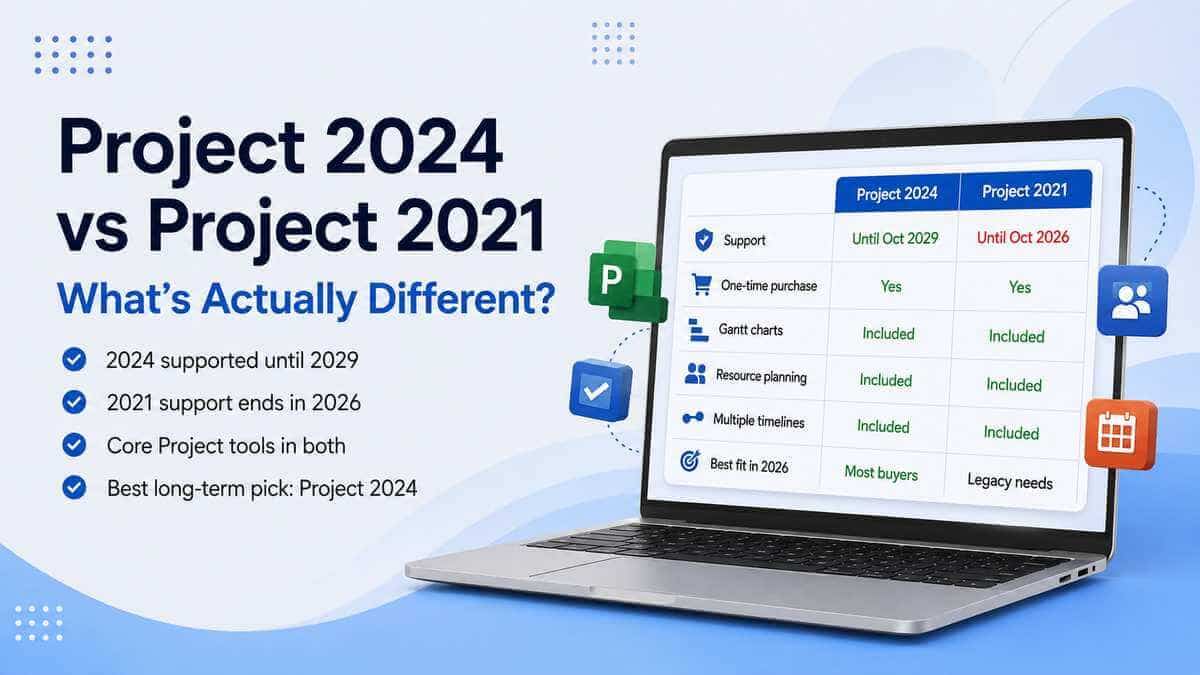
Both are perpetual, one-time-purchase licences — no subscription attached to either. Both include the core toolset people associate with Project: Gantt charts and scheduling, task dependencies with automatically calculated dates, resource planning, multiple timelines, what-if scenarios, baselines for tracking planned versus actual progress, built-in reports, and professional project-management tools. None of that basic Project functionality is exclusive to 2024 — Project 2021 already provides a substantial desktop toolset.
The genuine difference is support. Project 2024 is covered by Microsoft until October 2029; Project 2021 runs out in October 2026. That's roughly three extra years of official support behind the newer version, for a purchase that otherwise looks and feels much the same day to day.
Why the support date matters more than any feature does
Some online comparisons make Project 2024 sound like a totally reworked application, as if Microsoft invented Gantt charts and resource planning for the first time in 2024. It didn't — Project 2021 already offers a genuinely substantial professional toolset. If you're weighing this up purely on capability, the difference can look smaller than the version numbers suggest.
The bigger reason to choose 2024 isn't that it turns Project into a completely different application. It's the support clock. Microsoft lists Project 2021 as retiring on 13 October 2026, while Project 2024 is supported until 10 October 2029.
End of support does not normally mean the installed application suddenly switches off the following day. What changes is Microsoft's support position: you should no longer expect the same ongoing servicing, security fixes or technical support available to a version that is still inside its lifecycle. For a tool your business depends on for live project data, that's a genuinely different risk profile.
What Project Professional 2024 actually offers
Beyond the support window, Project Professional 2024 is the current perpetual desktop release. Microsoft's own Project Professional 2024 listing covers templates, scheduling, resources, reporting, timesheets, what-if scenarios and multiple timelines — the comprehensive on-premises toolset people expect from Project Professional.
It's also specifically listed as compatible with Office LTSC and Office 2024, which makes it the more natural fit if you're setting Project up alongside a newer Office install rather than an older one.
Worth being careful about, though: compatibility isn't automatic just because two products share a release year. Office, Project and Visio compatibility depends on the specific version, installation technology, update channel, and whether everything's running matching 32-bit or 64-bit architecture. Don't assume a fresh Project install will slot neatly alongside whatever Office is already on the machine without checking first.
What Project 2021 still genuinely offers
It hasn't suddenly become a lesser piece of software — it's still a capable desktop project-management application doing the job it was designed to do. The issue in 2026 isn't that the core Project workflow has disappeared; it's the calendar.
Project 2021 still makes sense where an organisation's already standardised on that generation, a specific workflow or deployment requires it by name, you're matching an existing environment for compatibility reasons, or you only need it short-term and you're going in with eyes open about the October 2026 date. Outside of those specific situations, there's not much reason for a fresh purchase in 2026 to choose the older generation.
Already running Project 2021? Should you upgrade?
If it's doing everything you need right now, there's no urgent reason to replace it solely because Project 2024 exists — the core workflow carries across recognisably, and Project 2024 isn't a completely different piece of software you'd need to relearn.
The real question is whether you're comfortable continuing to rely on Project 2021 once it's outside Microsoft's support window, particularly for anything business-critical. If you're buying a fresh licence today rather than deciding the fate of an existing install, Project 2024 is the easier recommendation simply because you're not spending money on a version approaching retirement.
Will Project 2024 open my existing Project 2021 files?
Project desktop uses the standard .mpp Project Plan format, and Microsoft's current Project file-format documentation applies to both Project Professional 2024 and Project Professional 2021. For ordinary Project plans, moving to the newer desktop version should not mean rebuilding schedules from scratch.
As with any file that matters to the business, it's worth keeping a backup before changing software versions regardless — cheap insurance against anything going sideways during the switch.
Can I install Project 2024 alongside my existing Office?
Possibly — it genuinely depends on what's already installed. Microsoft's deployment guidance explains that Office, Project and Visio compatibility hinges on installation technology, version, update channel and architecture, not just whether they're nominally the "same year."
A 32-bit Office install and a 64-bit Project install, for instance, shouldn't be assumed compatible just because both happen to run on the same version of Windows. Check your current Office version and the specific Project edition's requirements before buying, rather than after.
Project Professional 2024 vs Planner and Project Plan 3
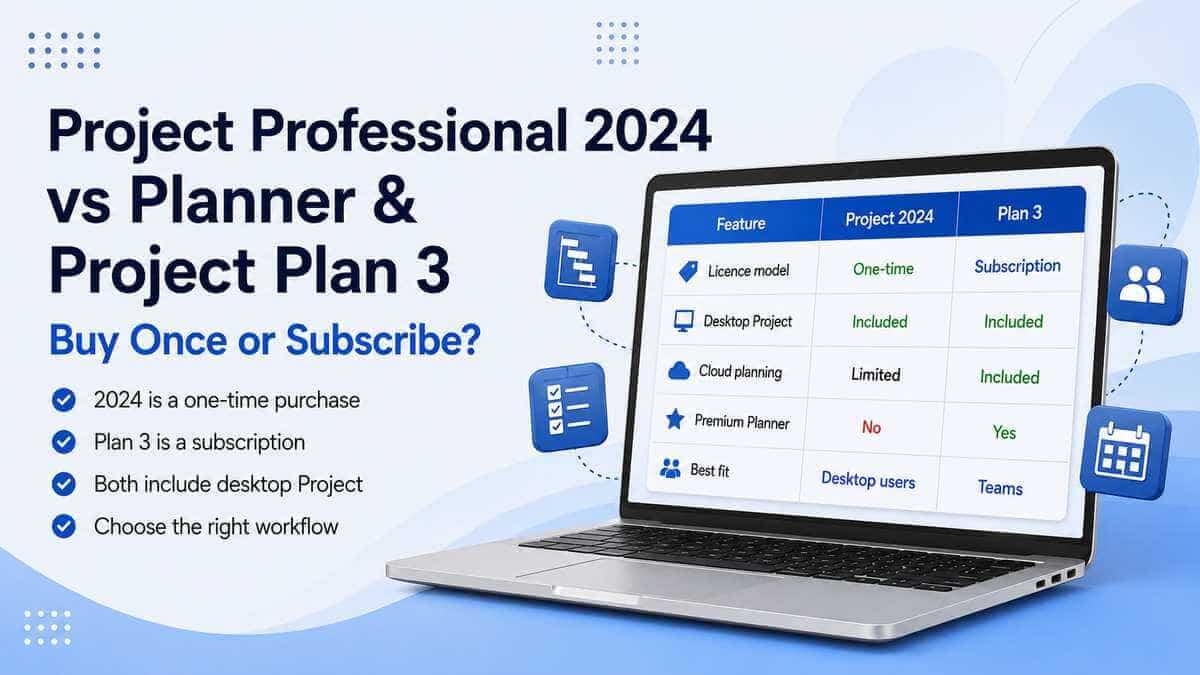
Project Professional 2024 is a straightforward one-time purchase — pay once, with no ongoing subscription required to keep using that licensed desktop copy. Microsoft's subscription alternative now lives under the Planner umbrella as Planner and Project Plan 3.
Microsoft says the core features of Project Professional 2024 and Project Plan 3 are nearly identical when initially purchased. The important difference is what happens afterwards: Plan 3 requires an active subscription and keeps you on Microsoft's current subscription version, while Project Professional 2024 is perpetual and does not receive ongoing feature additions in the same way. It can still receive servicing and security updates during its supported lifecycle.
Plan 3 makes more sense where an organisation genuinely wants subscription-based, cloud-connected work management with continuous updates. Project Professional 2024 suits anyone who specifically wants the traditional desktop application, bought once.
One thing worth knowing if Project Online has ever come up for you: Microsoft is retiring Project Online on 30 September 2026. That's a separate cloud service, not the desktop Project application discussed here — Microsoft says Project desktop itself isn't affected by that retirement. But if your organisation's been relying on Project Online specifically, that date deserves its own attention rather than getting lost in a desktop-version comparison.
So which one's right for you?
Project Professional 2024 is the stronger pick if:
- You're buying Project now for ongoing use.
- You want Microsoft's support extending into 2029.
- You prefer the current perpetual generation.
- You're setting up or refreshing a modern Office environment.
- You prefer paying once rather than maintaining a Project subscription.
Project Professional 2021 can still make sense if:
- You have a specific compatibility requirement tying you to Project 2021.
- Your organisation has already standardised on the 2021 generation.
- You're matching an existing Project 2021 environment.
- You understand that Microsoft's support lifecycle ends in October 2026.
Comparing Project against Visio, or want to see everything currently available? Browse our Microsoft Project & Visio licences.
Our take
For most new purchases in 2026, Project Professional 2024 is the better long-term choice. Project 2021 hasn't gotten worse at its job — the two remain close enough in day-to-day use that there's little reason for a new buyer to pick the older generation without a specific reason tying them to it.
The deciding factor is squarely the support timeline: Project 2021 exits Microsoft's support window on 13 October 2026; Project 2024 carries on until October 2029.
Microsoft Project Professional 2024
Ready to see what's included? View the full feature list, compatibility details and licence terms.
View Microsoft Project Professional 2024Frequently asked questions
Is Project 2024 better than Project 2021?
For most new purchases in 2026, yes — mainly because of support length. Both offer a substantial desktop project-management toolset; Project 2024 simply has roughly three more years of official Microsoft support ahead of it.
When does Microsoft Project 2021 support end?
13 October 2026. Microsoft's current Project 2024 lifecycle page lists support until 10 October 2029.
Will Project 2021 just stop working after October 2026?
No — reaching end of support does not normally disable the installed application. What changes is Microsoft's support and servicing position. Continuing to rely on Project 2021 after that date means using a version outside its supported lifecycle, which is worth weighing up for anything business-critical.
Is Project Professional 2024 a subscription?
No — it's Microsoft's perpetual desktop Project product, a one-time purchase. That's different from Planner and Project Plan 3, which is subscription-based.
Does Project Professional 2024 include Copilot AI?
Microsoft does not list integrated Copilot as a feature of the perpetual Project Professional 2024 product. Microsoft's newer AI-assisted work-management features are focused on its Planner and subscription ecosystem rather than being a feature Microsoft advertises for the perpetual Project 2024 desktop licence.
Does Project Professional 2024 work with Windows 11?
Yes. Microsoft's current Project Professional 2024 requirements list Windows 11. They also list Windows 10, although Windows 10 itself reached the end of its normal support lifecycle in October 2025, so Windows 11 is the more appropriate environment for a new 2026 setup.
Can Project 2024 open files created in Project 2021?
Project Professional 2024 and Project Professional 2021 both use Microsoft's standard Project Plan (.mpp) format. Microsoft's current file-format guidance applies to both versions, so ordinary Project plans can be carried forward without rebuilding the schedule from scratch.
Can I install Project 2024 alongside my existing Microsoft Office?
Often, but it depends on your specific Office version, installation technology, update channel and architecture (32-bit vs 64-bit) — worth checking before buying rather than assuming.
Is Project Professional 2024 the same as Planner and Project Plan 3?
No. Microsoft says the core features are nearly identical when initially purchased, but Project Professional 2024 is a perpetual licence while Plan 3 requires an active subscription and keeps you on Microsoft's current subscription version.