Project Professional 2024 vs Planner and Project Plan 3: Buy Once or Subscribe?
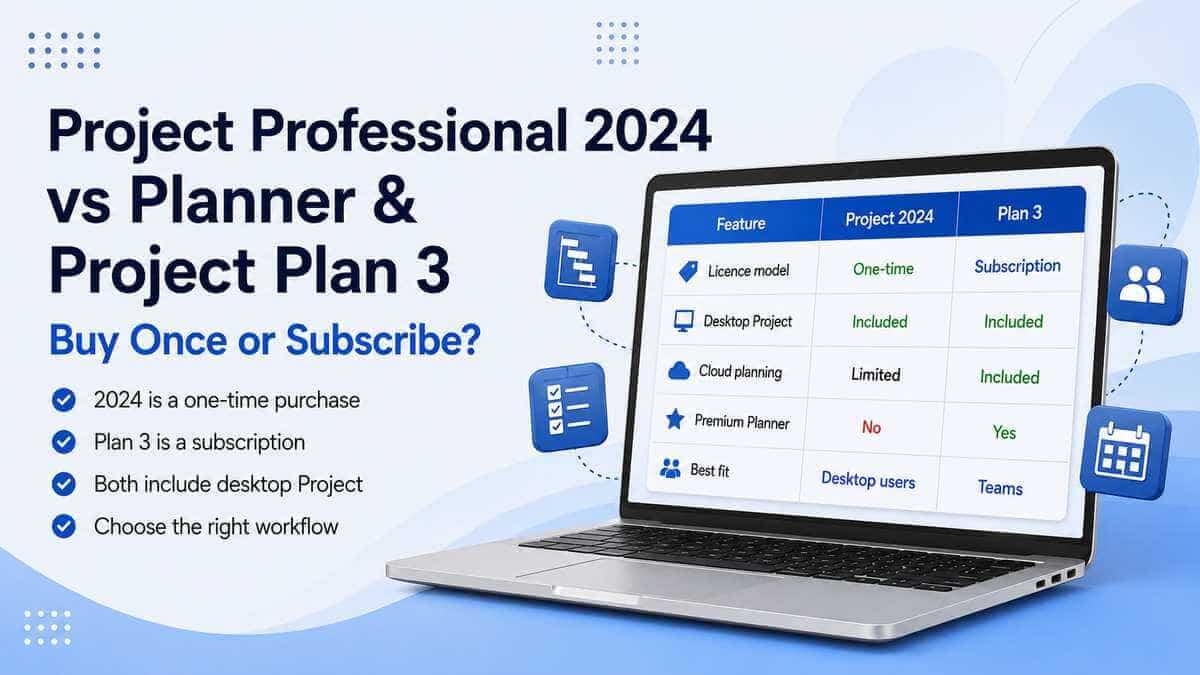
The short answer: if what you actually want is the traditional Microsoft Project desktop application on one PC, Project Professional 2024 is the simpler route — buy the licence once, use it, and there's no monthly Project subscription turning up afterwards.
Planner and Project Plan 3 is a genuinely different kind of product, not just a more expensive way to get the same thing. You're paying per user on an ongoing basis, but in return you get Microsoft's subscription-based Project desktop client alongside premium Planner tools, cloud-based collaboration and features that continue developing while the subscription stays active.
So the real question was never "which one is actually Microsoft Project?" Both give you serious Microsoft project-management tools. The real decision is whether you want to buy a fixed desktop version outright or subscribe to Microsoft's wider planning platform.
First, what happened to Project Plan 3?
If you've searched for this recently, the naming alone can throw you.
What used to be called Project Plan 3 is now Planner and Project Plan 3. Microsoft renamed it on 18 September 2024 as part of its wider move to bring Project for the web and Planner together under the newer Microsoft Planner experience.
The Project desktop application didn't vanish in that rename. Planner and Project Plan 3 still includes Microsoft's Project desktop client alongside the premium Planner functionality.
So when somebody says "Project Plan 3" today, they're generally talking about the subscription now officially called Planner and Project Plan 3.
What actually differs between the two
Both give you serious desktop Project capabilities, and neither skimps on the core planning tools. Scheduling, dependencies, resources, costs and project plans are not suddenly subscription-exclusive concepts.
The desktop experience overlaps considerably, which is exactly why this comparison gets confusing.
What you're really paying the ongoing cost for with Plan 3 is the wider service wrapped around the desktop software rather than a fundamentally different version of basic project planning.
What Project Professional 2024 actually is
It's Microsoft's current perpetual desktop version of Project. "Perpetual" simply means you buy that licensed version once, install it on the licensed PC and keep using that version without maintaining a monthly Project subscription.
It gives you the traditional Project toolset: Gantt charts, task scheduling, dependencies, resources, costs, baselines, multiple timelines, reports, what-if scenarios, project templates and advanced planning tools.
Microsoft's current Project 2024 lifecycle page lists the release as supported until 10 October 2029.
That support window doesn't mean every new Project feature Microsoft develops between now and then lands in your copy. Perpetual releases are largely fixed products. They receive servicing during their supported lifecycle, but Microsoft isn't continuously adding cloud-service features to them in the same way it develops Planner.
For a lot of buyers, that's not a downside at all. They specifically want Project to keep being Project.
What Planner and Project Plan 3 actually gives you
Plan 3 is a subscription, licensed to a user rather than being a one-time purchase of a fixed desktop release.
Microsoft includes the Project desktop client as part of it, but that's genuinely not the whole product.
Microsoft's current Plan 3 offering adds premium planning capabilities including advanced dependencies with lead and lag, task history, critical path, resource-request capabilities, scheduling and costing tools, and the wider premium Planner environment.
Plan 3 also includes everything in Planner Plan 1, bringing features such as Timeline (Gantt) views, task dependencies, premium templates, backlogs and sprints, project goals and people-management tools.
Comparing Plan 3 purely against the Project Professional 2024 desktop application therefore slightly misses the point. You're really weighing one perpetual desktop product against a wider subscription service that also includes a Project desktop client.
Just want Project on your PC? 2024 is the simpler answer
Picture the straightforward case: you've used Project for years. You sit down at your Windows PC, open a project file, build a schedule, put together a Gantt chart, manage resources and produce reports.
You don't especially care about Planner in Teams. You don't need Microsoft's web-based premium planning environment. You don't need every cloud feature the moment it ships. And you'd rather not add another ongoing software subscription.
Project Professional 2024 fits that requirement extremely well.
You're buying the traditional desktop application because that's genuinely what you need, nothing more.
Paying an ongoing subscription purely to reach the desktop Project client, when the rest of what Plan 3 offers doesn't add anything to your actual workflow, can be difficult to justify.
Where Plan 3 starts making real sense
The calculation changes once Project stops being one person's job on one machine.
Plan 3 gets genuinely interesting when planning becomes a team activity rather than a file passed around between people.
Microsoft's newer Planner environment is designed around collaborative work, with premium planning capabilities sitting alongside Microsoft's wider Microsoft 365 ecosystem.
For an organisation already living inside Teams, SharePoint and Microsoft 365, that connected experience can be worth considerably more than another isolated desktop application sitting on its own.
The simplest way to think about it: Project Professional 2024 is primarily a desktop software purchase. Plan 3 is a subscription to a wider planning service that also includes Microsoft's Project desktop client.
Choosing Plan 3 doesn't mean losing the desktop app
Worth clearing up, because this trips people up.
Going with Plan 3 doesn't mean abandoning the desktop Project application for a stripped-down web task board.
The subscription includes Microsoft's Project desktop client alongside the premium Planner environment.
A project manager can therefore keep using desktop Project while the organisation also makes use of Microsoft's cloud-based planning tools.
That's a genuinely different proposition from the basic Planner experience included with many ordinary Microsoft 365 subscriptions.
Doesn't Microsoft 365 already include Planner?
Often, yes — and this is exactly where the licensing gets easy to misread.
Many eligible Microsoft 365 subscriptions include the standard Planner experience, with useful task-management basics such as boards, lists, charts, assignments and Teams integration.
Premium Planner capabilities require an appropriate paid licence.
Planner and Project Plan 3 sits higher up that stack and includes the advanced Project capabilities and Project desktop client.
Having Microsoft 365 therefore doesn't automatically mean you've already got the equivalent of Plan 3.
It's worth checking exactly which licence is assigned to your Microsoft account rather than assuming "Planner is included" means every Planner feature is included.
The licensing model matters as much as the features
Most software comparisons fixate on feature lists. With these two, how you're actually charged is arguably just as important.
Project Professional 2024 is a one-time software purchase.
Plan 3 is an ongoing per-user subscription that continues for as long as the user needs the licensed service.
For one person planning to use Project for several years, those are genuinely different financial shapes.
For a business with staff regularly joining and leaving, the subscription model can be easier to administer because access is assigned by user rather than being another standalone perpetual software purchase.
Neither is automatically the smarter choice. They're solving different problems.
What happens if you cancel Plan 3?
This is one of the sharpest practical differences between the two.
Project Professional 2024 doesn't need an active Project subscription simply to keep the licensed perpetual copy working.
Plan 3 does depend on an active subscription for the services and software rights supplied through that subscription.
That's ordinary subscription-software behaviour rather than a hidden catch, but it's worth having clearly in mind before comparing the two purely on upfront cost.
Does Professional 2024 keep gaining new features?
Not in the same continuous way as the subscription service, and it isn't really designed to.
Project Professional 2024 receives support through its lifecycle, but it's a perpetual release rather than Microsoft's continuously evolving Planner service.
For a business with established processes, that stability can genuinely be a feature rather than a limitation — software that isn't constantly changing underneath its users.
Other organisations actively want Microsoft's newest capabilities as they arrive, and that's where the subscription model becomes more attractive.
What about Copilot?
Microsoft has been building Copilot into the premium Planner experience.
Its current Planner documentation includes Copilot capabilities for eligible Planner and Project Plan 3 users, with features aimed at generating plans and tasks, setting goals, analysing progress and reacting to changes as a project develops.
That doesn't make Project Professional 2024 obsolete. It simply shows where Microsoft's newest AI and cloud-connected development is being concentrated.
If AI-assisted planning and Microsoft's collaborative Planner environment genuinely matter to how you work, that's a point in Plan 3's favour.
If what you want is a traditional desktop project-management application, it may not factor into your decision at all.
What about Project Online shutting down?
Worth separating this out clearly, because it's an easy name to mix into the conversation.
Microsoft is retiring Project Online on 30 September 2026.
Project Online is Microsoft's older cloud-based project and portfolio management service. Its retirement does not switch off the Project desktop application, and it doesn't mean Project Professional 2024 is being retired.
Microsoft explicitly says Project desktop will continue to be available and supported. Its cloud project-management direction is increasingly centred around Planner. :contentReference[oaicite:2]{index=2}
If your business genuinely depends on Project Online specifically, rather than simply using Project desktop, that September 2026 date deserves its own migration planning.
That's a separate question entirely from whether to buy Project Professional 2024 for a Windows PC. For more on the desktop generations themselves, our Project 2024 vs Project 2021 comparison covers that decision.
Which is better for one person working alone?
Usually Project Professional 2024.
If you're the one building and maintaining the plan, and what you mostly need is the desktop application's scheduling, resourcing and reporting tools, Plan 3's collaboration side may not justify an ongoing subscription — particularly if you're expecting to use Project for years.
If that same person also works heavily inside Teams and Planner alongside other people, the calculation shifts.
It's the actual workflow that should decide this, not the job title on the door.
Which is better for a team?
Plan 3 has the stronger case here.
Its premium Planner environment is designed for collaborative work across multiple people, while the Project desktop client can remain part of the project manager's toolkit.
For organisations already centred on Microsoft 365 and Teams, that's a genuinely meaningful advantage rather than a nice-to-have.
Can Project Professional 2024 work offline?
The traditional Project desktop application is installed Windows software, which is one reason perpetual Project remains attractive to people who don't want their core planning workflow centred entirely around a browser service.
Plan 3 also includes a Project desktop client, so subscribing doesn't force you into browser-only working either.
The real difference isn't simply "desktop versus web". It's the licence model and the additional services surrounding it.
So which should you actually choose?
Project Professional 2024 makes more sense if:
- You want the traditional Microsoft Project desktop application.
- You'd rather pay once.
- You're mainly working on a Windows PC.
- You don't need premium Planner collaboration.
- You don't need Microsoft's newest cloud features as they're released.
- You prefer a relatively stable version of the software.
- You're planning to use Project for several years.
- You don't want your Project licence to depend on an ongoing Plan 3 subscription.
Planner and Project Plan 3 makes more sense if:
- Project planning is genuinely collaborative across a team.
- Your organisation already works heavily in Microsoft 365 and Teams.
- You want premium Planner capabilities.
- You want Microsoft's cloud-based planning tools alongside desktop Project.
- You value continued subscription feature development.
- You want advanced dependencies, task history and resource-request capabilities.
- You prefer user-based subscription licensing.
- Microsoft's newer Copilot and Planner functionality matters to your workflow.
Our take
For anyone whose actual requirement is "I need Microsoft Project on my PC", Project Professional 2024 is the cleaner answer.
You buy the desktop application once, get the traditional Project workflow, and Microsoft's current product lifecycle lists the 2024 generation as supported until 10 October 2029.
Plan 3 starts making far more sense once the requirement becomes "our team needs to manage projects together inside Microsoft's cloud ecosystem". That's genuinely what the ongoing subscription is buying you.
The mistake worth avoiding works in both directions: paying for Plan 3 because you assume it's the only way to get a serious version of Microsoft Project, or buying Project Professional 2024 when what your organisation actually needs is a collaborative planning platform.
Start from the workflow, not the price tag.
If the work genuinely lives inside the Project desktop application, perpetual is difficult to argue against. If the work lives across people, Planner, Teams and Microsoft's cloud services, Plan 3 becomes the stronger proposition.
Want to see Microsoft's perpetual Project options? Browse our Microsoft Project & Visio licences.
Microsoft Project Professional 2024
Prefer the one-time-purchase route? View the full product details, compatibility requirements and licence information.
View Microsoft Project Professional 2024Frequently asked questions
Is Project Plan 3 still available?
Yes, under its current name. Microsoft renamed Project Plan 3 to Planner and Project Plan 3 on 18 September 2024.
Does Planner and Project Plan 3 include Microsoft Project desktop?
Yes. Microsoft's current Plan 3 offering includes the Project desktop client alongside its premium Planner capabilities.
Is Project Professional 2024 a subscription?
No. It's a perpetual, one-time-purchase desktop product rather than an ongoing Project subscription.
Does Project Professional 2024 expire?
The licence itself isn't a recurring subscription. Microsoft's current Project 2024 lifecycle page lists the release as supported until 10 October 2029.
Which is cheaper — Project Professional 2024 or Plan 3?
It depends on the purchase price, number of users and how long you'll be using it. Professional 2024 is a one-time cost, while Plan 3 is an ongoing per-user subscription, so the comparison changes considerably over several years.
Does Project Professional 2024 include Planner?
No. Project Professional 2024 is the desktop Project product. Planner and its premium cloud functionality are part of Microsoft's separate Planner licensing and subscription ecosystem.
Does Microsoft 365 include Project Plan 3?
No. Some Microsoft 365 subscriptions include the standard Planner experience, but Planner and Project Plan 3 requires the appropriate additional subscription licence.
Can I use Project desktop with Plan 3?
Yes. Planner and Project Plan 3 includes Microsoft's Project desktop client.
Does Project Professional 2024 keep getting new features?
Not in the same continuous way as Microsoft's subscription services. It is a perpetual release supported through its lifecycle rather than an automatically evolving Planner subscription.
Is Project Online the same as Project Plan 3?
No. Project Online is Microsoft's older cloud project-management service and is scheduled to retire on 30 September 2026. Planner and Project Plan 3 is a current subscription offering that includes premium Planner capabilities and Microsoft's Project desktop client.