Microsoft Visio 2024 vs Visio 2021: Which Should You Buy?
The short answer: for most people buying a perpetual copy of Visio in 2026, Visio Professional 2024 is the better long-term pick. Visio 2021 hasn't gotten worse at drawing a flowchart — it's still a genuinely capable diagramming application, and nothing about how you use it day to day has become outdated overnight. What's actually changed is how long Microsoft keeps supporting each one.
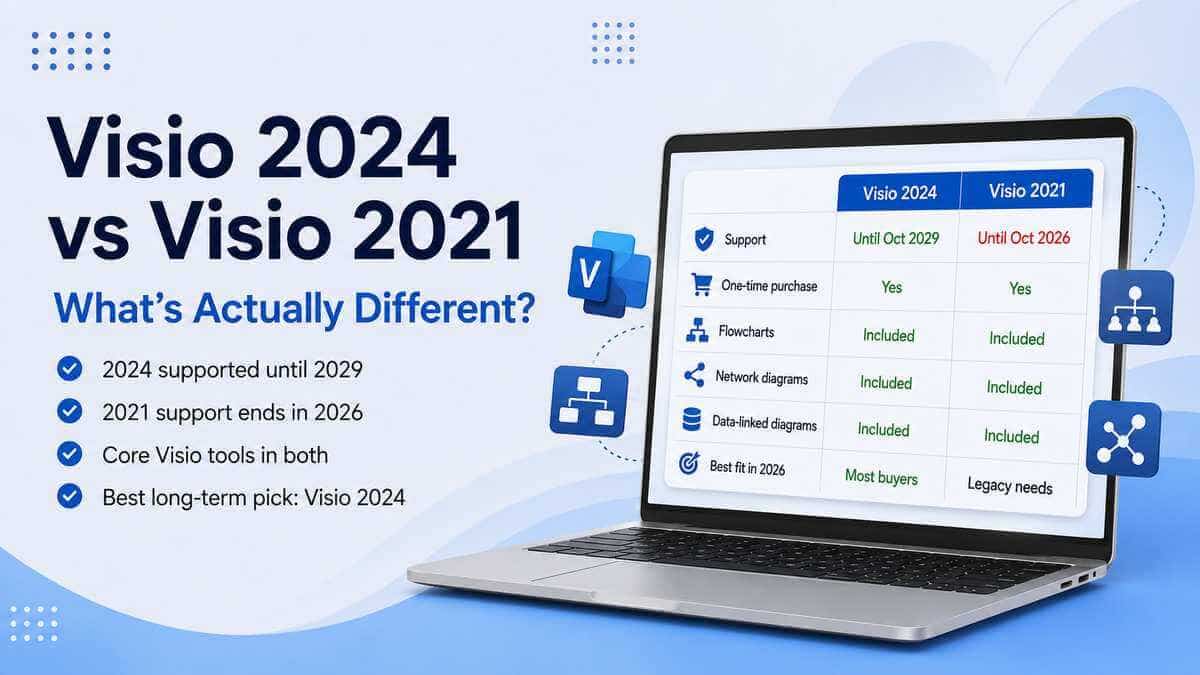
Visio 2021 reaches end of support on 13 October 2026; Visio 2024 runs until 9 October 2029. Visio 2024 also brings some genuinely useful extras on top — more shapes and stencils, better search and a refreshed interface — but if you're weighing this up purely on "which one draws a better org chart?", you're asking the wrong question. The support window is what should actually decide this for most people.
The two side by side
Both are perpetual, one-time-purchase versions of Visio — no subscription attached to either. Both cover the core toolset most people actually reach for Visio to do: flowcharts, organisation charts, network diagrams, process maps, technical diagrams, and a solid library of professional templates and shapes.
Visio Professional 2021 was already a substantial, properly professional application — choosing 2024 isn't a move up from some stripped-down drawing tool.
The genuine differences are the newer content in 2024 — extra shapes, stencils and templates, a cleaner search experience, and an interface that matches the newer Office look — and, far more importantly for a 2026 purchase, the support timeline sitting underneath all of it.
Why the support date matters more than any feature does
It's easy to get pulled into comparing feature lists when two software generations sit side by side. Here, the calendar is doing more of the deciding than the feature list is. Visio 2021 is officially listed as reaching end of support on 13 October 2026 — Visio 2024 runs until 9 October 2029.
Nothing dramatic happens the morning after that October 2026 date — an installed copy of Visio doesn't suddenly refuse to open and your diagrams don't vanish. What changes is Microsoft's support position: the product has reached the end of its supported lifecycle and should no longer be relied upon for the same ongoing servicing and support available to a current release.
For the odd personal diagram now and then, that might be a risk you're entirely happy to live with. For a business relying on Visio for network documentation, infrastructure diagrams or process maps that actually matter operationally, using software outside its support window is a different kind of decision.
What Visio Professional 2024 actually adds
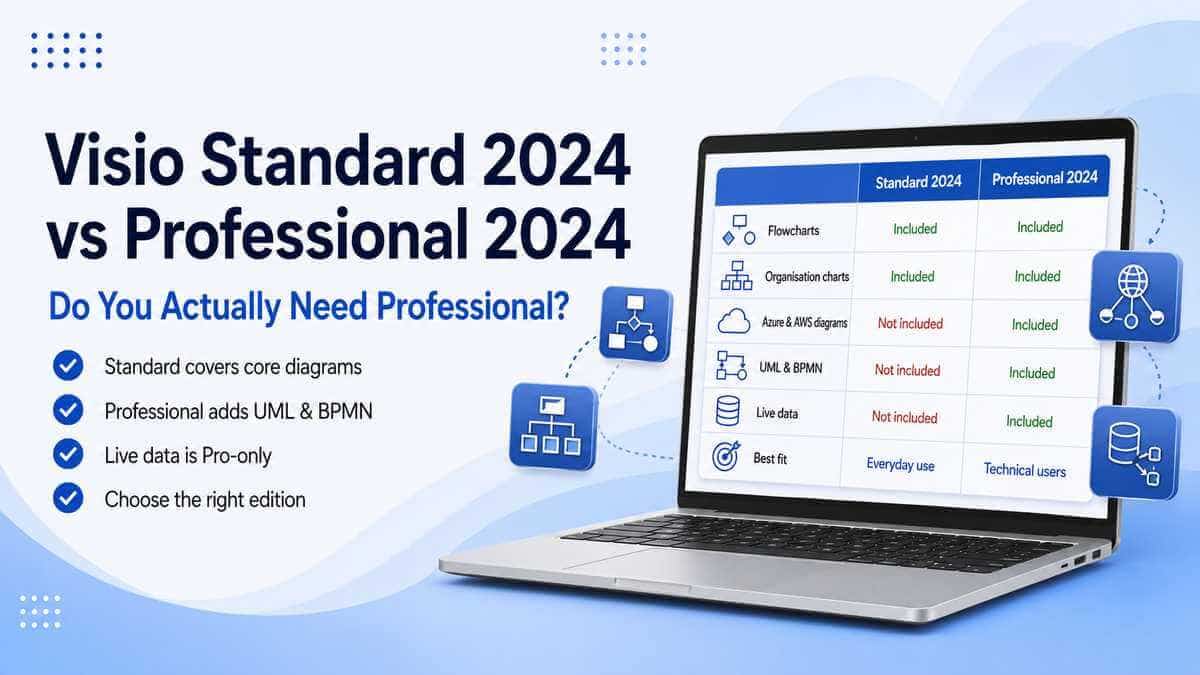
There are real improvements here, they're just worth keeping in proportion. Visio 2024 adds more shapes, stencils and templates, plus newer professional content aimed specifically at areas like Azure, networking and software development — genuinely useful if you're documenting current cloud or infrastructure setups.
Visio Professional 2024 includes more than ten additional Azure stencils as well as newer network and software-development content, including Kubernetes shapes. The interface has also been refreshed to match the newer Office look, and search is now available directly from the title bar, making it quicker to find the command or feature you're actually after.
Worth being honest, though: if you already know Visio 2021 well, opening 2024 won't feel like relearning the software. The core diagramming workflow is exactly where you left it.
What Visio Professional 2021 still genuinely offers
It hasn't quietly become bad software because a newer version exists.
It still handles flowcharts, org charts, network and infrastructure diagrams, floor plans, business process diagrams, UML and BPMN diagrams, data-connected diagrams and technical visualisations exactly as you'd expect from Visio Professional.
Nobody's argument for choosing 2024 should be "2021 can't build a decent network diagram anymore" — it plainly still can.
The actual issue is how much supported runway is left on it. Visio 2021 still makes sense where an organisation's deliberately standardised on that generation, you're matching an existing deployment, or a specific workflow genuinely requires it by name.
Outside of those situations, there's not much reason for a completely fresh purchase in 2026 to reach for the older version.
Already running Visio 2021? Should you upgrade?
Not necessarily right away.
If it's installed, working, and doing exactly what you need, the newer shapes and search improvements aren't the kind of thing that justifies ripping out a working setup on their own.
The more important question is what happens once it passes the October 2026 support date — worth deciding that ahead of time rather than discovering months later that something business-critical has quietly drifted outside support.
If you're buying fresh today rather than deciding the fate of an existing install, the choice is easier: Visio 2024 simply has several more years of official support sitting behind it.
Will Visio 2024 open my existing Visio 2021 diagrams?
For ordinary modern files, yes — moving from 2021 to 2024 shouldn't mean rebuilding anything from scratch. Standard modern Visio drawings use the .vsdx format, which both generations support.
There can always be exceptions if a particular file leans on unusual features, specialist templates or older formats, so it's worth keeping a backup of anything genuinely important before changing software versions.
A sensible precaution: keep a copy of any important Visio files before opening and resaving them in a newer software version. It costs nothing and means you've still got the untouched original if something behaves unexpectedly.
Can I install Visio 2024 alongside my existing Microsoft Office?
Often, but it depends on what's already on the machine — Microsoft doesn't determine Office and Visio compatibility purely from matching release years.
Installation technology, Office version, update channel and architecture all factor in when deciding which Office-family products can be installed together.
Architecture is the one most worth double-checking: Office-family applications running together need compatible 32-bit or 64-bit installations. A 64-bit Office installation paired with a 32-bit Visio installation shouldn't simply be assumed to work.
Check what's currently installed before buying, rather than trying to untangle an incompatible setup afterwards.
Visio Professional 2024 vs Visio Plan 2
Worth understanding before you buy, since the two aren't quite the same shape of product.
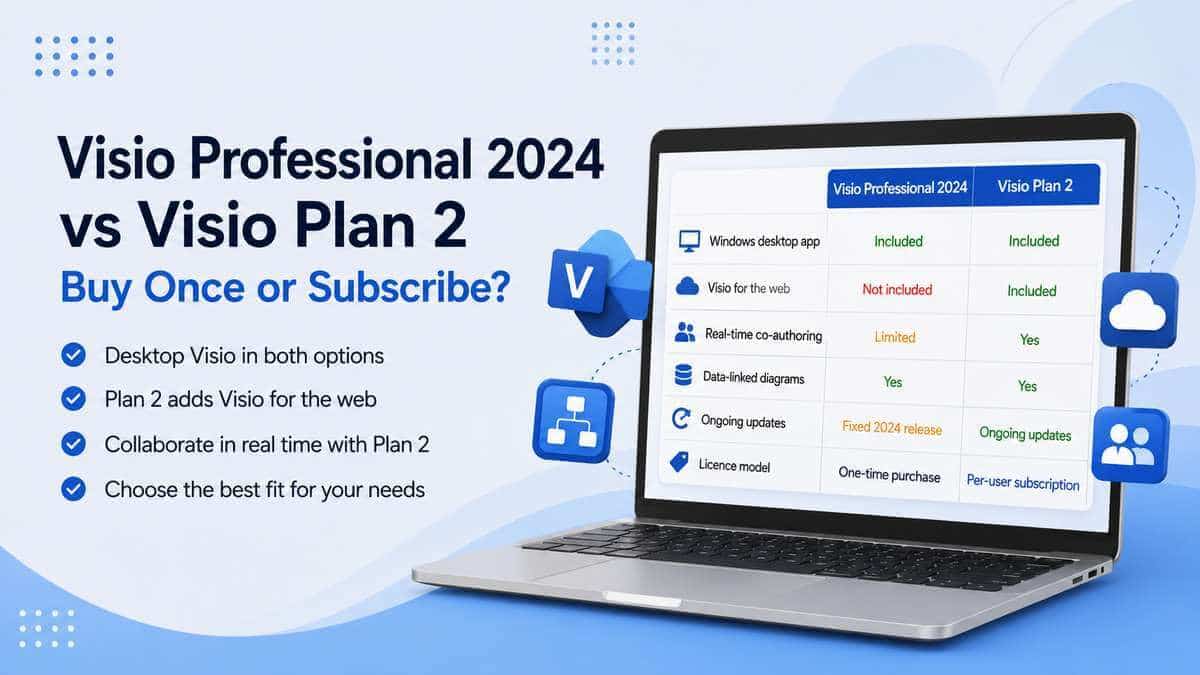
Visio Professional 2024 is the traditional route — pay once, with no ongoing Visio subscription needed to keep using that licensed desktop copy.
Visio Plan 2 is Microsoft's subscription model instead, bundling the desktop application together with web and cloud-connected Visio functionality, and continuing to receive subscription features while the subscription remains active.
Plan 2 suits an organisation that specifically wants cloud collaboration and a continuously updated subscription service as part of the deal.
Visio Professional 2024 suits anyone who just wants the traditional Windows desktop application, bought outright.
Isn't Visio already included with Microsoft 365?
A genuinely common point of confusion, worth clearing up plainly: a number of Microsoft 365 commercial plans include a lightweight Visio web experience.
That's real, but it isn't the same thing as owning the full Visio Professional desktop application.
The web version can be entirely adequate for basic diagrams and everyday visualisation. If you need the full desktop toolset, more advanced diagramming features, or specialist templates and shapes, that's still a separate product decision.
It's worth checking exactly what your existing Microsoft 365 plan includes before assuming you've already got everything you need from Visio.
So which one's right for you?
Visio Professional 2024 is the stronger pick if:
- You're buying Visio now for ongoing use.
- You want Microsoft's support running into 2029.
- You prefer the current perpetual generation.
- You'd genuinely benefit from the newer shapes and technical diagramming content.
- You're setting up or refreshing a modern Office environment.
- You'd rather pay once than maintain a Visio subscription.
Visio Professional 2021 still has a place if:
- You have a specific compatibility requirement tying you to it.
- Your organisation has already standardised on the 2021 generation.
- You're matching an existing Visio 2021 environment.
- You're proceeding with full awareness of the October 2026 support deadline.
Want to compare everything currently available across diagramming and project management together? Browse our Microsoft Project & Visio licences.
Our take
For most new purchases in 2026, Visio Professional 2024 is the better long-term choice — not because Visio 2021 has become poor software, but because the two remain close enough in everyday use that the deciding factor genuinely comes down to support length rather than capability.
Visio 2021 exits Microsoft's support window on 13 October 2026; Visio 2024 runs until 9 October 2029.
If you're spending money on a fresh Visio licence now with no specific reason tying you to 2021, the newer version simply gives you considerably more supported life for the same kind of purchase.
Microsoft Visio Professional 2024
Ready to see what's included? View the full feature list, compatibility details and licence information.
View Microsoft Visio Professional 2024Frequently asked questions
Is Visio 2024 better than Visio 2021?
For most new purchases in 2026, yes. Both offer a substantial professional diagramming toolset, but Visio 2024 adds newer shapes, stencils and interface improvements, and has roughly three more years of Microsoft support ahead of it.
When does Microsoft Visio 2021 support end?
Microsoft lists Visio 2021 as retiring on 13 October 2026.
When does Microsoft Visio 2024 support end?
Microsoft currently lists Visio 2024 as retiring on 9 October 2029.
Will Visio 2021 stop working after October 2026?
No — reaching the end of Microsoft's support lifecycle does not normally disable an installed copy of Visio. What changes is Microsoft's support and servicing position for that version.
What's actually new in Visio 2024?
Visio 2024 adds more shapes, stencils and templates, an updated interface and improved search. Visio Professional 2024 also includes newer professional diagramming content for areas such as Azure, networking and software development.
Can Visio 2024 open files created in Visio 2021?
Yes for standard modern Visio files. Both generations support the modern .vsdx format, although keeping a backup before changing software versions is always sensible for important business files.
Is Visio Professional 2024 a subscription?
No — it's a perpetual, one-time-purchase desktop product. Visio Plan 1 and Visio Plan 2 are Microsoft's subscription-based Visio options.
Is Visio included with Microsoft 365?
A lightweight web version of Visio is included with a number of Microsoft 365 commercial plans, but that's not the same as owning the full Visio Professional desktop application.
Can I install Visio 2024 alongside Microsoft Office?
Often, but it depends on your specific Office version, installation technology, update channel and architecture. Check what's currently installed before adding Visio rather than assuming any Office and Visio combination will work together.
Do I need to upgrade from Visio 2021 immediately?
Not purely because Visio 2024 exists. If your current installation works and meets your needs, the real question is whether you're comfortable continuing to rely on it once Microsoft's support ends in October 2026.