Is Microsoft Project Included With Microsoft 365? What You Actually Get
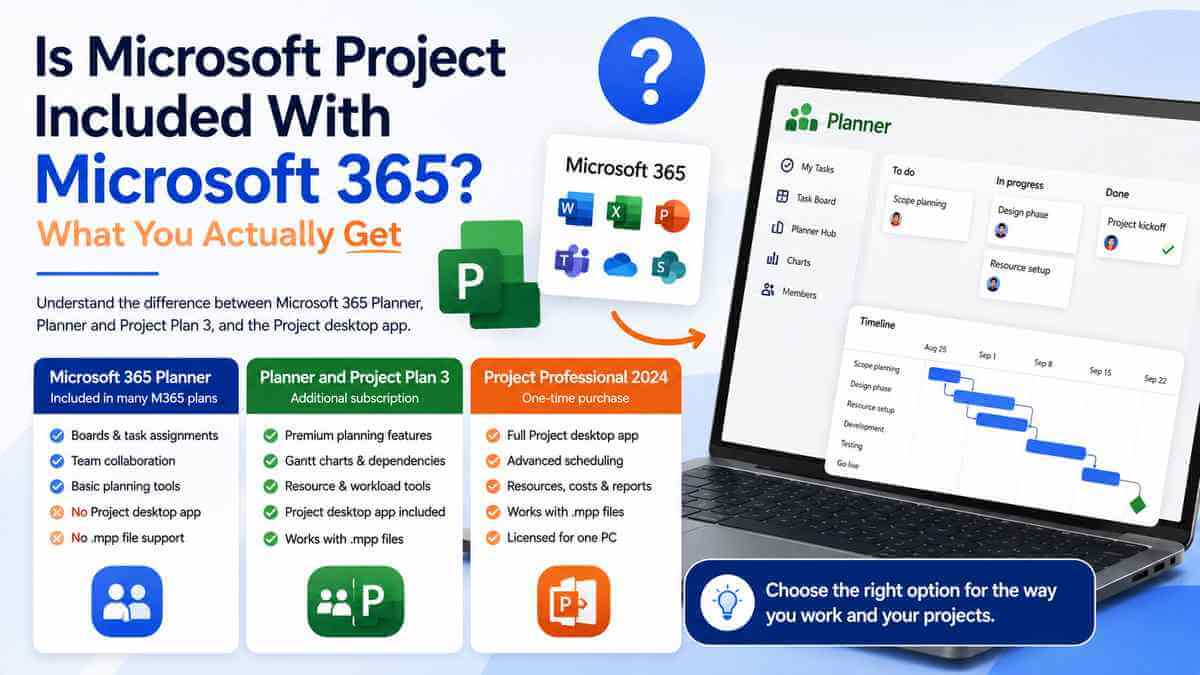
The short answer: if by "Microsoft Project" you mean the proper desktop application with Gantt charts, detailed scheduling, costs, resources and the familiar .mpp project files, then no — it isn't automatically included with a normal Microsoft 365 subscription.
What many Microsoft 365 business plans do include is Microsoft Planner. And this is where the confusion starts, because Planner has gradually absorbed more of Microsoft's project-management world, Project Plan 3 is now called Planner and Project Plan 3, and Microsoft still sells the traditional Project desktop application separately.
So seeing Planner inside your Microsoft 365 account doesn't necessarily mean you've already got Microsoft Project. You might already have enough for what you're trying to do — or you might be missing the exact application you thought you'd already paid for.
Why this has become so confusing
A few years ago the distinction was easier.
Microsoft Project was Microsoft Project. Planner was Planner. You could look at the names and have a decent idea what you were dealing with.
Microsoft has since brought more project-management functionality into Planner, Project for the web has moved into the newer Planner experience, and Project Plan 3 was renamed Planner and Project Plan 3.
Meanwhile, the traditional Windows Project application is still available separately as Project Standard 2024 and Project Professional 2024.
That's how we end up with customers asking a perfectly sensible question:
"I've already got Microsoft 365. Why can't I find Project?"
Usually because the Microsoft 365 plan includes Planner — not the full Project desktop application.
What do you actually get?
The easiest way to understand the difference is that Microsoft 365 may already give you a perfectly useful project-planning tool.
It just doesn't necessarily give you the Microsoft Project desktop application.
What a normal Microsoft 365 business plan actually gives you
A number of Microsoft's business subscriptions include Planner alongside the usual Microsoft 365 services.
That standard Planner experience is useful. It can handle everyday team task management with boards, lists, assignments and charts.
For a lot of teams, that's genuinely all they need.
If you're organising who's doing what, assigning tasks, tracking work through stages and keeping everybody on the same page, Planner can actually be easier than opening Microsoft Project and building a full project schedule.
The mistake is assuming that because Planner can manage projects, it's therefore the same thing as Microsoft Project desktop.
It isn't.
Planner isn't just a renamed copy of Microsoft Project
This is worth making clear because Microsoft's current naming can make it look that way.
The basic Planner experience included with eligible Microsoft 365 subscriptions is designed primarily around collaborative task and work management.
Microsoft's premium Planner plans add considerably more advanced project-management functionality, including things such as Timeline/Gantt views, dependencies, custom fields, workload tools and project goals.
That's much closer to what people traditionally associate with serious project-management software.
But even then, premium Planner and the traditional Project desktop application aren't simply interchangeable names for exactly the same thing.
The desktop application remains its own product.
So where does the Project desktop application come from?
You've essentially got two main routes.
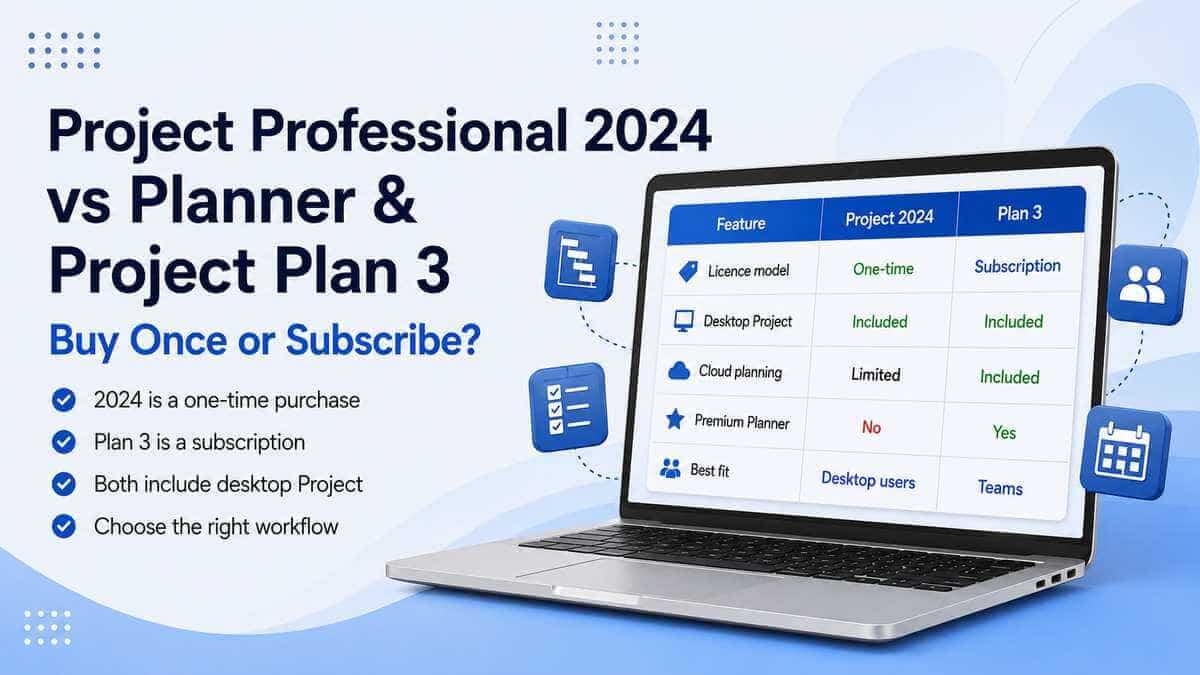
The first is to buy a perpetual desktop copy such as Project Professional 2024 or Project Standard 2024.
That's the traditional model: buy the software once, install it on the licensed Windows PC and use that version without maintaining a monthly Project subscription.
The second route is Microsoft's Planner and Project Plan 3 subscription.
Plan 3 includes Microsoft's Project desktop client alongside premium Planner capabilities.
That means somebody with Plan 3 can work in the installed Project application while also using Microsoft's cloud-based planning environment.
Important: having a normal Microsoft 365 business subscription does not automatically give you Plan 3 just because Planner appears in your app list.
Is basic Planner enough instead of buying Project?
Quite possibly.
And it's worth checking before buying anything.
If your project is basically a set of tasks assigned to different people, moving through stages with due dates, and everyone just needs to see what's happening, Planner may already cover the job perfectly well.
For that type of work, opening a full Microsoft Project schedule can actually make life more complicated than it needs to be.
Not every project needs Microsoft Project.
Sometimes a board with clear tasks, owners and deadlines is exactly the right tool.
When Planner starts feeling too basic
The gap becomes easier to see once the schedule itself starts doing real work.
You may need things such as:
- linked task dependencies;
- detailed Gantt scheduling;
- critical-path analysis;
- resource allocation;
- project costs;
- baselines;
- advanced scheduling;
- detailed reports;
- .mpp Project files;
- what-if planning.
That's where a proper Project product starts making considerably more sense.
Premium Planner does add some advanced planning capabilities, which is why the dividing line isn't as clean as it once was.
But if your requirement is specifically:
"I need the Microsoft Project desktop program."
Then basic Planner inside Microsoft 365 isn't the answer.
What does Planner and Project Plan 3 add?
Planner and Project Plan 3 is Microsoft's subscription route for somebody who needs more than ordinary Planner.
It includes premium planning functionality alongside Microsoft's Project desktop client.
Microsoft's current Plan 3 offering includes advanced capabilities such as dependencies, critical path, task history, resource-management features, scheduling and costing.
The subscription also sits inside Microsoft's wider collaborative Planner environment.
So somebody already heavily invested in Microsoft 365 and Teams may find Plan 3 a very natural fit.
The team can work around Planner while the project manager still has access to desktop Project.
That's considerably different from simply buying a standalone Project licence for one machine.
But I already pay for Microsoft 365 — why would Project cost extra?
Because Microsoft doesn't treat every specialist application as part of the standard Microsoft 365 package.
Microsoft 365 gives you a broad productivity platform.
Depending on the plan, that can include Word, Excel, PowerPoint, Outlook, Teams, OneDrive, SharePoint, Planner and plenty of other services.
Specialist products can still sit outside it or require an additional licence.
Project is one of those areas.
Visio works in a similar way: some Microsoft 365 plans include a lighter Visio web experience, but that doesn't automatically mean the user owns Visio Professional desktop.
The fact that you're already paying for Microsoft 365 doesn't mean every Microsoft business application is automatically included.
Do Microsoft 365 Personal or Family include Project?
No normal Microsoft 365 Personal or Family subscription should be treated as including the traditional Microsoft Project desktop application.
They're primarily consumer productivity subscriptions built around applications and services such as Word, Excel, PowerPoint, Outlook and OneDrive.
If you've got Microsoft 365 Personal or Family and need the full Project desktop application for a Windows PC, Project is a separate product decision.
Can I install Project alongside Microsoft 365 Office?
Often, yes — but check before you buy.
This is one of those areas where "they're both Microsoft products" isn't enough information.
Office and Project compatibility can depend on:
- which Office version is already installed;
- the installation technology;
- the update channel;
- whether Office is 32-bit or 64-bit;
- which Project product you're adding.
The architecture in particular matters.
You shouldn't assume a 32-bit Project installation will happily sit beside 64-bit Office, or vice versa.
If you've already got Microsoft 365 Apps installed, check that setup before adding a perpetual Project product.
It's much easier than buying first and troubleshooting afterwards.
Does Project Professional 2024 need Microsoft 365?
No.
Project Professional 2024 is a standalone Project product.
You don't need to take out a Microsoft 365 subscription simply to use Project Professional 2024.
That can be useful for somebody who already has the Office applications they need, or whose workplace supplies Office separately, but who specifically wants Microsoft Project on one PC.
Project Professional 2024 is a one-time-purchase desktop product, and Microsoft's current Project 2024 lifecycle runs until 10 October 2029.
Does Project Professional 2024 include Microsoft 365?
No — it works the other way around too.
Buying Project Professional 2024 doesn't suddenly give you Word, Excel, Outlook, Teams, OneDrive and everything else in Microsoft 365.
You're buying Project.
Project Professional 2024 is a specialist desktop product. Microsoft 365 is a wider productivity subscription.
They can work alongside each other without being the same licence.
Do I need Project if I've already got Excel?
Possibly not.
People have managed projects in Excel for years, and for small or relatively straightforward jobs it can still be completely adequate.
If you just need a list of tasks, dates, costs and status information, there's nothing wrong with that.
Project starts earning its place when the relationships between those tasks matter.
Move one task by three days and what happens to everything depending on it?
Which activities are driving the finish date?
Which resources are overloaded?
What happens if you move work between people?
How far has the live project moved away from the original baseline?
Those are the sorts of questions Project is designed to answer without you building a spreadsheet that eventually becomes its own full-time job to maintain.
What if I only need a Gantt chart?
Don't automatically jump straight to Project Professional.
This is another area where Microsoft's newer Planner matters.
Premium Planner includes Timeline/Gantt functionality.
So if the only reason you're considering Project is because somebody said "we need a Gantt chart", it's worth looking at the wider requirement first.
If you need collaborative online planning with a timeline, premium Planner may fit better.
If you need the traditional desktop Project environment with detailed scheduling, costs, resources and .mpp files, Project is the more obvious route.
The presence of a Gantt chart on its own doesn't decide it anymore.
What if somebody sends me a .mpp file?
Now you're much closer to a traditional Project use case.
.mpp is Microsoft's standard Project Plan format used by Project desktop.
If clients, suppliers or colleagues regularly send you Project files that you need to properly edit and maintain, having the actual Project desktop application makes much more sense than trying to work around it with a simpler task-management product.
That's particularly true if those plans contain detailed dependencies, resources, costs, baselines or other Project-specific information.
Which option is better for one person?
If one person needs Project on one Windows PC and primarily works independently, I'd look seriously at Project Professional 2024.
You buy it once, you get the traditional desktop application, and you're not adding another ongoing per-user Project subscription.
If that person already spends most of the day inside Teams and Planner and works collaboratively with other people, Plan 3 may make more sense despite the subscription.
Again, it's the workflow that matters more than the job title.
Which option is better for a team?
This is where Planner becomes much more relevant.
If the project involves lots of people updating tasks, collaborating, checking workloads and working through Microsoft 365, keeping everything in Microsoft's cloud planning environment can have real advantages.
Plan 3 also gives the licensed project manager the Project desktop client.
So this doesn't have to be a choice between "serious Project" and "collaboration". Microsoft's subscription model is designed to give you both.
That may be more than you need.
But for the right organisation, that's exactly why the extra licence exists.
So what do you actually need?
Your existing Microsoft 365 Planner may be enough if:
- You mainly manage simple team tasks.
- You use boards and lists rather than detailed schedules.
- You don't need .mpp files.
- You don't need project costs or complex resource management.
- Your existing Planner features already cover the workflow.
Planner and Project Plan 3 makes more sense if:
- Your team works collaboratively in Microsoft 365.
- You want premium Planner functionality.
- You need advanced dependencies and project scheduling.
- You want cloud planning alongside desktop Project.
- You prefer user-based subscription licensing.
- You need the Project desktop client as part of a wider Microsoft service.
Project Professional 2024 makes more sense if:
- What you actually want is Microsoft Project desktop.
- You primarily work on a Windows PC.
- You need .mpp project files.
- You use detailed scheduling, resources, costs and reports.
- You prefer buying the software once.
- You don't need premium Planner collaboration.
- You expect to use the same version for several years.
Our take
The phrase "Microsoft Project is included with Microsoft 365" is too vague to be useful.
What's commonly included with Microsoft 365 business plans is Planner.
Planner is genuinely useful, and for a lot of teams it may completely remove the need to buy Project.
But it isn't automatically the same thing as owning the Microsoft Project desktop application.
If you need advanced collaborative planning, Microsoft's premium Planner subscriptions — particularly Planner and Project Plan 3 — are worth looking at.
If what you actually mean is:
"I want the normal Microsoft Project program installed on my PC and I'd rather buy it once."
Then Project Professional 2024 is the more straightforward route.
Don't buy Project just because the name sounds more serious than Planner.
And don't assume you've already got Project just because Planner appeared in your Microsoft 365 apps.
Start with what you're actually trying to manage. Once you know that, the licensing becomes considerably less confusing.
Want to compare the subscription and perpetual routes in more detail? Read our Project Professional 2024 vs Planner and Project Plan 3 guide.
If you're deciding between the two perpetual desktop editions, our Project Standard 2024 vs Professional 2024 comparison explains where Professional actually adds something.
You can also browse our Microsoft Project & Visio licences.
Microsoft Project Professional 2024
Need the traditional Project desktop application? View the full product details, compatibility requirements and licence information.
View Microsoft Project Professional 2024Frequently asked questions
Is Microsoft Project free with Microsoft 365?
The traditional Microsoft Project desktop application isn't automatically included with a normal Microsoft 365 subscription. Many business plans include Microsoft Planner instead.
Does Microsoft 365 Business Standard include Project?
Microsoft 365 Business Standard includes Planner, but that shouldn't be treated as meaning the subscription automatically includes the full Microsoft Project desktop application.
Does Microsoft 365 include Planner?
Many Microsoft 365 business subscriptions include the standard Planner experience for team task and work management.
Is Planner the same as Microsoft Project?
No. Planner and Project now overlap considerably more than they used to, particularly with premium Planner features, but the traditional Project desktop application remains a separate product.
Which Microsoft subscription includes the Project desktop app?
Microsoft's Planner and Project Plan 3 subscription includes the Project desktop client alongside premium Planner capabilities.
Can I buy Microsoft Project without Microsoft 365?
Yes. Microsoft sells Project Standard 2024 and Project Professional 2024 as one-time-purchase desktop products.
Is Project Professional 2024 a subscription?
No. Project Professional 2024 is a perpetual, one-time-purchase product rather than an ongoing Project subscription.
Can Project Professional 2024 be installed alongside Microsoft 365?
Often yes, but compatibility depends on the Office installation already on the computer, including architecture, installation technology and update channel. Check the existing setup before installing.
Does Microsoft 365 Personal include Microsoft Project?
No normal Microsoft 365 Personal subscription should be assumed to include the traditional Project desktop application. Project is a separate product.
Do I need Project if I already have Planner?
Not necessarily. If Planner already handles your tasks and team workflow, there may be no benefit in buying Project. Project becomes more useful when you need detailed scheduling, .mpp files, resources, costs, baselines and other advanced desktop project-management tools.
Does Planner have Gantt charts?
Microsoft's premium Planner plans include Timeline/Gantt functionality. The standard Planner experience included with many Microsoft 365 subscriptions does not provide the same full premium feature set.
Can Microsoft Project open .mpp files?
Yes. .mpp is Microsoft's standard Project Plan file format and is one of the main reasons people who regularly receive or maintain Project files may need the desktop application.