Project Standard 2024 vs Professional 2024: Do You Actually Need Professional?
The short answer: Project Standard 2024 is a lot more capable than the name makes it sound. If what you actually need is to build proper project schedules, create Gantt charts, manage tasks and costs, set milestones and dependencies, track progress against a baseline and keep resources from being double-booked, Standard already does all of that.
Project Professional 2024 includes everything in Standard, then adds the bits aimed more at organisations managing people and projects at a broader level — things like Team Planner, timesheets, more comprehensive resource management and the ability to connect into Project Server.
So this isn't really a case of Standard being the basic version and Professional being the "proper" version. For plenty of people, Standard is already proper Microsoft Project. The question is whether you actually need the extra management tools Professional adds.
What both versions already do
This is probably where most comparisons go wrong.
They start listing all the impressive things Project Professional can do without mentioning that Standard can do most of the everyday project-management work too.
Both versions let you build a structured project plan. You can create tasks, set start and finish dates, link dependencies, add milestones, work with Gantt charts, track the critical path, manage costs, allocate resources, use baselines and produce reports.
Standard also includes resource levelling, so if somebody is overloaded because you've assigned them more work than they can realistically do, Project can help you spot and resolve that.
You get Calendar, Gantt Chart, Network Diagram and Task Sheet views as well.
In other words, Project Standard isn't Microsoft giving you a glorified to-do list and saving all the actual project-management features for Professional.
There's a serious amount of Project in both editions.
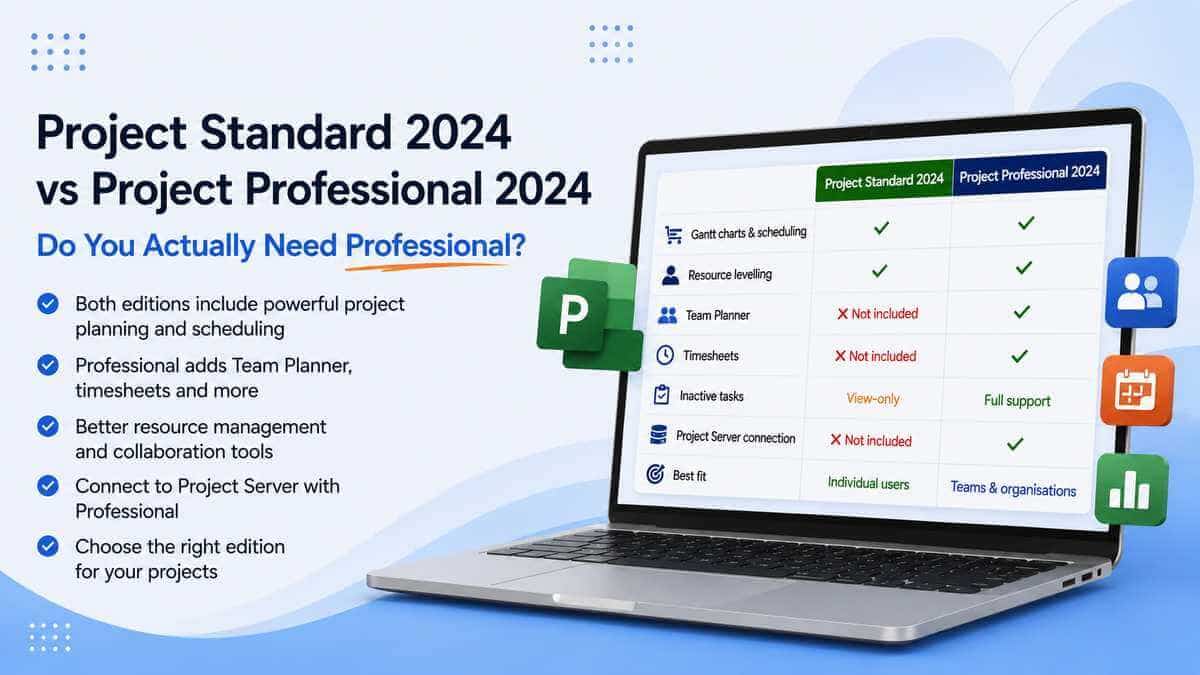
The two side by side
That gives a much better idea of where the actual dividing line sits.
It's not Gantt chart versus no Gantt chart.
It's largely standalone project planning versus the more advanced people, resource and organisational side of Project.
Project Standard 2024 is more capable than people expect
If you're running one project — or even several projects — yourself, Standard may genuinely be all you need.
You can build a plan from scratch or a template, create dependencies between tasks, automatically calculate dates, set milestones, track the critical path and save a baseline so you've got something to compare the real project against later.
You can add people, equipment and materials as resources. You can assign them to tasks. You can track what those resources cost.
You can see workloads and use resource levelling when somebody has too much work assigned.
And you can create proper built-in Project reports rather than exporting everything to Excel every five minutes.
That's not a lightweight project manager.
For somebody managing a project on their own PC, there's a good chance Standard already covers the things they actually bought Microsoft Project to do.
So what does Professional really add?
Professional starts making sense when you're doing more than simply planning the work.
The headline difference is more comprehensive resource management.
That's slightly vague until you put it into a real-world context.
Standard lets you create resources, assign them to tasks, monitor workloads and level overallocations.
Professional goes further into managing those people and resources across a broader project-management environment.
It adds Team Planner, more complete handling of inactive tasks, timesheets and the ability to connect Project into Microsoft's Project Server environment.
For somebody managing their own project plan, those may be features they never touch.
For an organisation with project managers, shared resources and people recording time against work, they can be exactly the reason Professional exists.
The simplest way to think about it: Standard already handles serious scheduling, costs and normal resource management. Professional becomes more useful when managing the people around those projects is just as important as managing the tasks.
Team Planner is one of the clearer Professional extras
Team Planner gives you a visual way of looking at who is doing what and when.
Instead of only thinking about the project in terms of tasks, you can look at the work through the people assigned to it.
That becomes useful very quickly when the same team members appear across several tasks and you're trying to work out why somebody has somehow ended up scheduled for 26 hours of work on Tuesday.
Standard can still manage and level resources.
Professional's Team Planner simply gives you a more direct people-focused view of the problem.
If your projects are mainly about tasks and dates, you might never miss it.
If your day involves constantly balancing work across a team, it's much easier to see the appeal.
Timesheets: useful to some businesses, completely irrelevant to others
Professional also adds timesheet functionality.
That can be useful where an organisation needs people recording time against project or non-project work for tracking, billing, payroll or other internal processes.
Whether that matters is entirely dependent on how your organisation works.
A freelancer planning a building project might never need Project timesheets in their life.
A consultancy billing clients according to time spent could find them genuinely useful.
Likewise, an internal project office trying to understand where staff time is actually disappearing may get real value from them.
This is why choosing by the words "Standard" and "Professional" isn't particularly helpful.
The feature only matters if it solves something you actually do.
Resource management is where the editions really start separating
Both editions understand resources.
That's important because you'll sometimes see comparisons suggesting Standard can't properly manage resources at all.
It can.
Standard includes resource levelling and normal resource-cost management. If you've got five people working on a project and need to assign them to tasks, monitor their workloads and resolve obvious overallocations, Standard isn't suddenly useless.
Professional is aimed at going further.
Team Planner and timesheets sit naturally alongside that more advanced approach, and Professional makes more sense where Project is part of a wider organisational project-management setup rather than one person's standalone project file.
That's the distinction I'd actually pay attention to.
What about Project Server?
This is one of the clearest Professional-only reasons to choose it.
Project Professional 2024 can connect to Project Server Subscription Edition.
Standard isn't designed for that role.
Project Server is Microsoft's on-premises platform for organisations doing project and portfolio management across a larger environment.
It's not something the average person buying Project for one PC is going to have sitting in the corner of the office by accident.
If your organisation uses Project Server and your Project installation needs to connect into it, you're firmly in Professional territory.
If you've never heard of Project Server and nobody in your business has mentioned it, it's probably not the reason you need Professional.
Does Professional make Gantt charts better?
Not in the way that question usually means.
Standard already includes the proper Gantt Chart view. It handles tasks, dependencies, milestones, scheduling and critical path.
Professional doesn't unlock some secret second Gantt chart where the bars suddenly become more accurate.
The actual scheduling foundation is shared.
That's worth knowing because somebody managing a reasonably complicated project can look at the word "Standard" and assume they're going to hit a ceiling the moment the schedule stops being simple.
That isn't really how these editions are split.
Professional's advantages sit much more around managing teams, resources, time and organisational integration than around making an ordinary project schedule fundamentally better.
Can Standard manage costs?
Yes.
Standard isn't just task scheduling. It can manage project costs and track resource costs as part of the project plan.
You can also compare planned progress and budget against what actually happens as the project moves forward.
That means somebody managing a project with labour, materials and a budget doesn't automatically need Professional purely because money is involved.
Again, the decision only starts shifting toward Professional when its broader management features become relevant.
What about reports?
Both have them.
Project Standard includes built-in reporting around project information and progress, and Professional retains those capabilities because it includes everything Standard does.
So reporting alone isn't a good reason to pay for Professional either.
Gantt charts? Both. Baselines? Both. Critical path? Both. Costs? Both. Resources? Both. Reports? Both.
Professional isn't better because it contains all the normal Project features and Standard doesn't.
It earns its place through a smaller group of more advanced features.
What about inactive tasks?
This is one of the smaller differences, but worth mentioning.
Inactive tasks are useful when you want to temporarily remove work from affecting the schedule without deleting it completely.
Think of a project where you've got an optional phase that might happen later.
Deleting those tasks means losing the information. Leaving them active means they continue affecting dates and resources.
Project Professional gives you fuller control over inactive tasks, while Microsoft's comparison lists them as view-only in Standard.
For many people this will be a fairly minor difference.
For somebody doing lots of scenario planning and maintaining complex plans, it can be considerably more useful.
Can both versions handle large projects?
Yes.
Don't confuse "Standard" with "small project".
Standard isn't deliberately capped at a handful of people and 50 tasks so that you have to upgrade once the project gets serious.
You can build complicated schedules with large numbers of tasks, dependencies and resources in Standard.
The choice is about features, not whether Microsoft considers your project important enough to deserve Professional.
A very large project managed primarily by one person may still fit Standard's feature set.
A smaller project involving formal timesheets, Team Planner or Project Server might justify Professional.
Which is better for someone working alone?
I'd seriously consider Standard.
If you're the project manager and the plan mainly lives with you, ask yourself what Professional would actually add to the way you work.
Do you need Team Planner?
Do people submit timesheets through the Project environment?
Are you connecting to Project Server?
Are you managing resources in a way that goes beyond normal assignments, costs and levelling?
If the answer to all of those is no, Standard may cover an awful lot of your workload already.
Professional isn't automatically a better purchase simply because you're using Project for business.
Which is better for a team?
This is where Professional starts having a stronger case.
Not because Standard can't contain several people as resources — it absolutely can.
The difference is what you're doing with those people.
If one project manager creates the schedule, assigns the team and basically owns the Project file, Standard can still be workable.
If the organisation has a more formal project-management setup, needs Team Planner, captures timesheets, shares resources more extensively or connects into Project Server, Professional becomes much easier to justify.
It's the management structure rather than the number of people on the company payroll that should decide it.
What about a small business?
Exactly the same rule applies.
"Small business" doesn't tell you anything particularly useful about which edition to buy.
A company with three staff could manage complex client projects, track billable time and genuinely need Professional.
Another business with 50 people might have one operations manager creating straightforward schedules and be perfectly happy with Standard.
Don't buy Professional because the company is a business.
Buy Professional because one of its extra features actually solves something your business needs.
Both versions are one-time purchases
Unlike the Planner and Project Plan 3 comparison, there's no subscription decision hiding in this one.
Project Standard 2024 and Project Professional 2024 are both one-time-purchase desktop products.
Microsoft's current Project 2024 lifecycle applies to the 2024 generation, with support running until 10 October 2029.
So you aren't choosing Standard because you want perpetual licensing and Professional because you want a subscription.
They're both perpetual Project 2024 products.
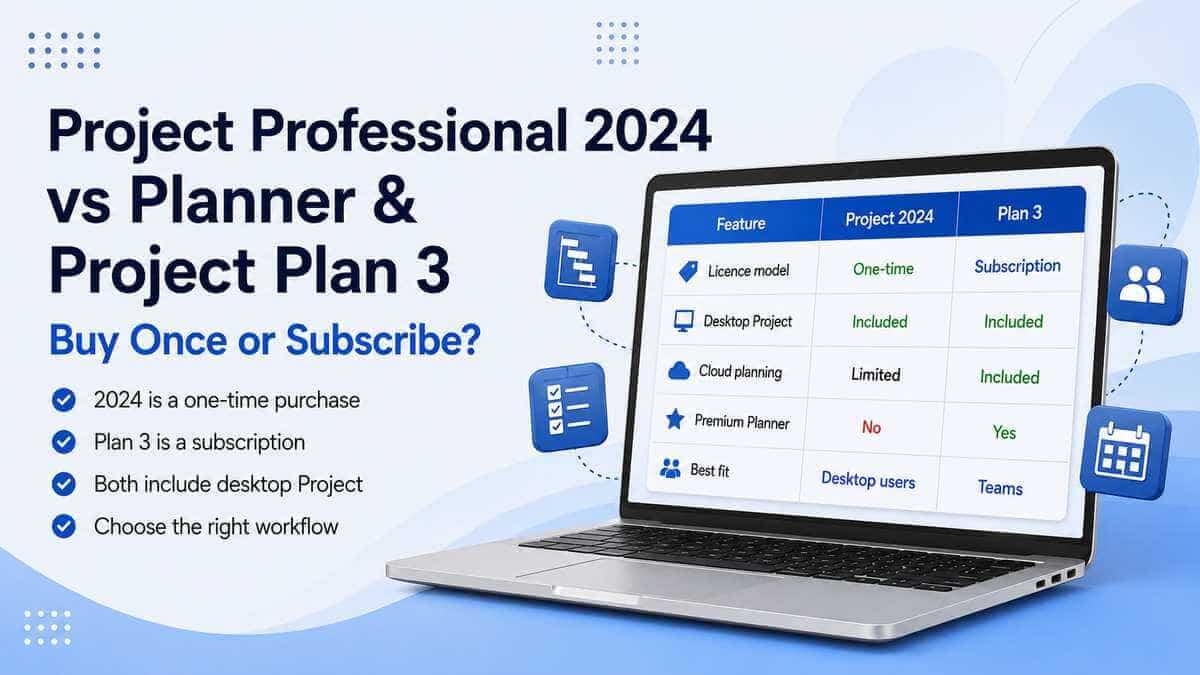
If subscription licensing and Microsoft's cloud-based Planner environment are what you're actually comparing, read our Project Professional 2024 vs Planner and Project Plan 3 guide instead.
So which should you actually choose?
Project Standard 2024 makes sense if:
- You mainly manage projects yourself.
- You need proper Gantt charts and scheduling.
- You use dependencies, milestones and critical path.
- You track costs and budgets.
- You assign resources to tasks.
- You need resource levelling.
- You use baselines and built-in reports.
- You don't need Project Server.
- You don't need Project timesheets.
- You don't need Team Planner.
Project Professional 2024 makes more sense if:
- You want everything in Project Standard.
- Resource management is a major part of your role.
- You need Team Planner.
- You need timesheet functionality.
- You make extensive use of inactive tasks.
- Your organisation uses Project Server Subscription Edition.
- Project is part of a broader organisational project-management setup.
- You already know one of the Professional-only tools is required by your workflow.
Our take
Project Standard 2024 is one of those products that sounds more limited than it actually is.
For someone who wants Microsoft Project to build schedules, create Gantt charts, manage tasks and dependencies, track costs, allocate resources and monitor progress, Standard already does the work most people associate with Project.
Professional isn't the version where "real project management" suddenly starts.
It's the version where Microsoft's desktop Project toolset expands further into team planning, timesheets, more comprehensive resource management and server integration.
If you need those things, Professional is the sensible choice.
If you don't, buying Professional purely because the name sounds safer can mean paying for features that sit untouched for the entire life of the software.
Look at the way you actually manage projects.
If one person largely owns the plan and Standard covers the scheduling, costs and resources involved, Standard may be enough.
If Project sits inside a broader team or organisational project-management environment, that's where Professional starts earning the upgrade.
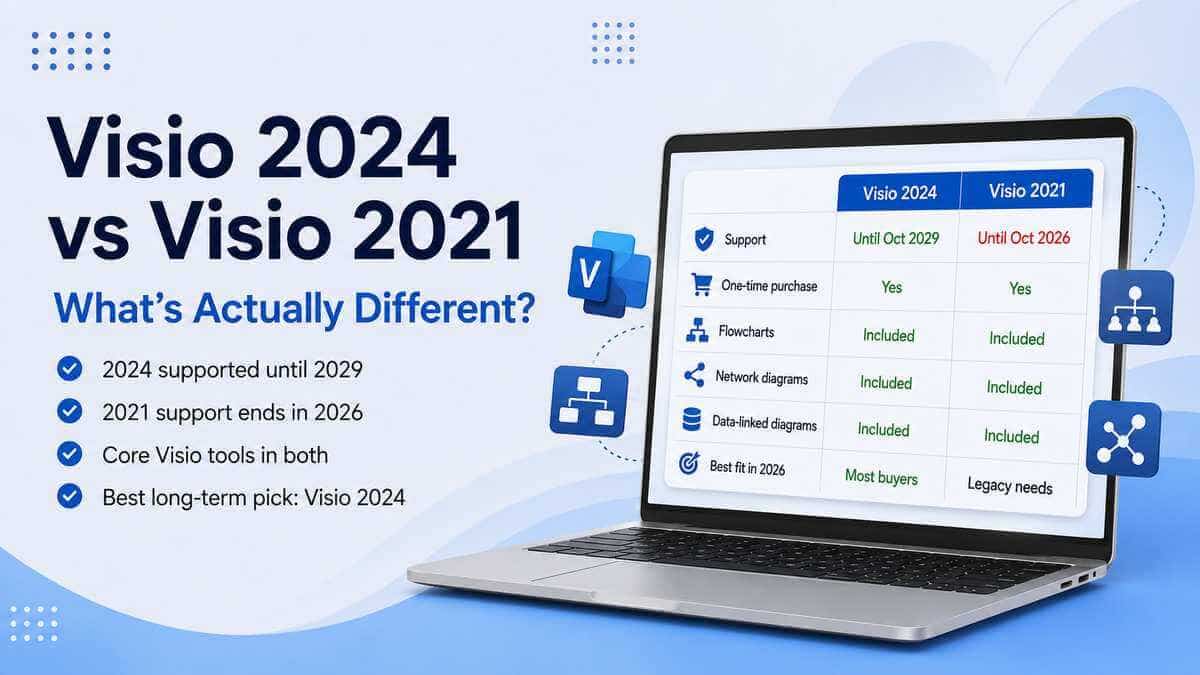
Want to compare the current Project generations as well? Read our Project 2024 vs Project 2021 guide.
You can also browse our Microsoft Project & Visio licences.
Microsoft Project Professional 2024
Professional the right edition for you? View the full product details, compatibility requirements and licence information.
View Microsoft Project Professional 2024Frequently asked questions
What's the main difference between Project Standard 2024 and Professional 2024?
Professional includes everything in Standard, then adds more advanced resource-management capabilities, Team Planner, timesheets and the ability to connect to Project Server Subscription Edition.
Does Project Standard 2024 include Gantt charts?
Yes. Standard includes Gantt Chart view along with task scheduling, dependencies, milestones and critical-path tools.
Can Project Standard manage resources?
Yes. Standard can add resources, assign them to tasks, track resource costs, monitor workloads and use resource levelling. Professional goes further with additional resource and team-management capabilities.
Does Project Standard include resource levelling?
Yes. Resource levelling is available in Project Standard 2024.
Does Project Standard manage project costs?
Yes. Standard includes task and cost management and can track resource costs as part of the project plan.
Does Project Standard include reports?
Yes. Standard includes Microsoft's built-in Project reporting tools.
What's Team Planner?
Team Planner is a Professional feature that gives project managers a visual way of viewing work across team members and seeing how assignments are distributed.
Does Project Standard include timesheets?
No. Timesheet functionality is part of Project Professional's more advanced project and resource-management feature set.
Which edition connects to Project Server?
Project Professional 2024 is the edition designed to connect to Project Server Subscription Edition.
Are both Standard and Professional one-time purchases?
Yes. Project Standard 2024 and Project Professional 2024 are both perpetual desktop products rather than Project subscriptions.
Are both supported for the same length of time?
They belong to the same Project 2024 generation, which Microsoft's current lifecycle lists as supported until 10 October 2029.
Is Professional automatically better for a business?
No. It depends on how Project is being used. A business user managing standalone schedules may have everything they need in Standard, while a smaller organisation using Team Planner, timesheets or Project Server may genuinely need Professional.