Is Microsoft Visio Included With Microsoft 365? What You Actually Get
The short answer: sort of — and that's exactly why this question causes so much confusion.
If you've got a qualifying Microsoft 365 business or education subscription, you may already have access to a lightweight version of Visio in your web browser.
But that does not mean you've got the full Visio desktop application installed on your PC.
The traditional Windows version of Visio — the one people usually mean when they ask for Microsoft Visio — is still a separate product.
So the answer isn't simply yes or no. Microsoft 365 may already include enough Visio for basic diagramming, but it doesn't automatically include the full desktop version.
Why this is more confusing than it should be
Microsoft has several products and services all carrying the Visio name.
There's:
- Visio in Microsoft 365;
- Visio Plan 1;
- Visio Plan 2;
- Visio Standard 2024;
- Visio Professional 2024.
All of them can legitimately be described as Visio.
They just don't all do the same thing.
That's how somebody can sign into Microsoft 365, see Visio in the app list and reasonably assume they've already got the full program.
Then they look for something to install on the PC and can't find it.
Nothing has necessarily gone wrong.
They may simply have the web version rather than the desktop application.
What Visio do you actually get with Microsoft 365?
Microsoft includes Visio in Microsoft 365 with qualifying Microsoft 365 commercial and education subscriptions.
This includes a number of common Microsoft 365 business plans.
It's a browser-based version.
There's nothing to install. You sign into Microsoft 365 and use Visio online.
And it isn't just a viewer.
You can create, edit and share general-purpose diagrams using the web app.
For somebody who occasionally needs to make a flowchart, organisation chart or straightforward business diagram, that may already be plenty.
Worth checking first: if your business already pays for an eligible Microsoft 365 subscription and you only need ordinary flowcharts or organisation charts, try the included Visio web app before buying another licence.
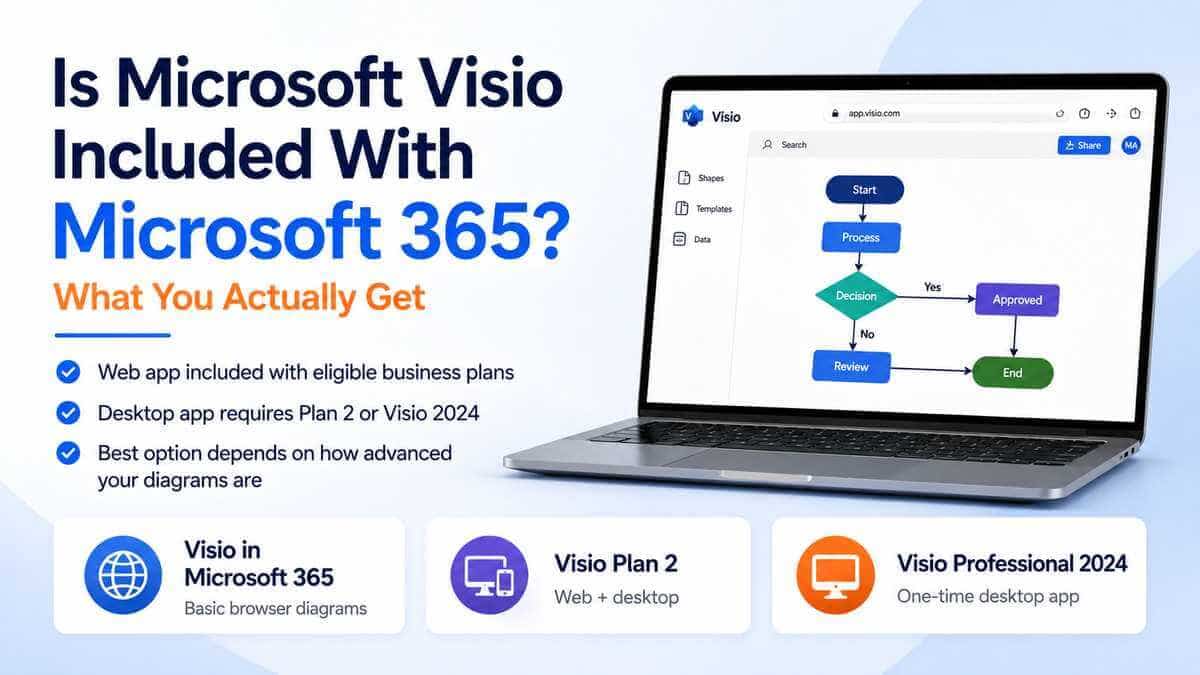
The Visio options side by side
That's the decision in a much more useful form.
If you're only making ordinary diagrams in a browser, you may already have enough.
If you specifically need the desktop application, the conversation changes.
But isn't Microsoft Visio supposed to be a paid product?
Yes.
This is where the wording matters.
Microsoft still sells dedicated Visio products because Visio in Microsoft 365 is the lightweight version, not the complete Visio product range.
Think of it less as Microsoft quietly giving everybody Visio Professional for free and more as Microsoft putting a useful core set of Visio capabilities into eligible Microsoft 365 plans.
If those capabilities cover what you need, great.
If they don't, that's where Visio Plan 1, Plan 2 or one of the perpetual desktop editions comes in.
What can Visio in Microsoft 365 actually do?
Quite a bit, considering it's already included in eligible subscriptions.
Visio in Microsoft 365 can create, edit and share general-purpose diagrams directly in a browser.
That includes common diagram types such as:
- basic diagrams;
- block diagrams;
- Venn diagrams;
- cycle diagrams;
- flowcharts;
- organisation charts;
- other general business diagrams.
It also supports collaboration, so several people can work around diagrams without emailing different copies backwards and forwards.
For everyday business diagramming, that's genuinely useful.
If somebody in HR needs an organisation chart or somebody in operations needs to map a straightforward process, there may be absolutely no reason to buy another Visio licence.
What doesn't the included version give you?
This is where you need to be careful.
Visio in Microsoft 365 isn't the full installed Windows application.
So if you're expecting to open the Start menu, search for Visio and launch a traditional desktop program, you may be disappointed.
The included version runs in the browser.
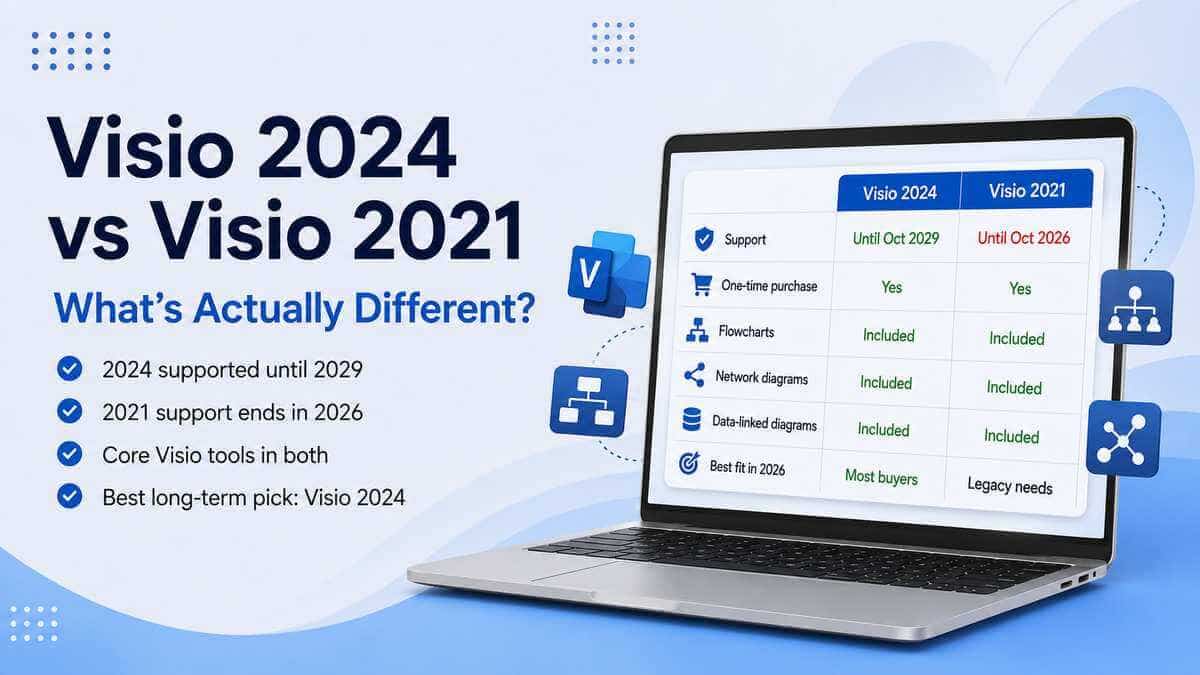
It also has a more limited collection of diagram types and advanced capabilities than Microsoft's paid Visio plans and Visio Professional desktop.
That's fine if you only need its core diagramming tools.
It's considerably less fine if your reason for needing Visio is an advanced network, engineering, software or data-connected diagram.
Does Microsoft 365 Business Standard include Visio?
Qualifying Microsoft 365 Business Standard commercial subscriptions can include the Visio in Microsoft 365 web experience.
That does not mean Business Standard includes Visio Professional desktop.
This distinction is probably the single most important thing to understand.
Someone can quite correctly say:
"Visio is included with Microsoft 365 Business Standard."
And somebody else can say that the full Visio desktop application isn't included.
They're talking about two different Visio experiences.
The lightweight web version may be included.
The full desktop application isn't automatically part of the subscription.
What about Microsoft 365 Business Basic?
The same general principle applies.
Business Basic is among Microsoft's qualifying commercial subscriptions for Visio in Microsoft 365.
So even though Business Basic is primarily web-based, an eligible user can still get access to the browser-based Visio experience.
Again, that doesn't give you Visio Professional installed on Windows.
Does Microsoft 365 Personal include Visio?
No.
Microsoft 365 Personal is a consumer subscription and shouldn't be treated as including the editable Visio in Microsoft 365 experience supplied with qualifying commercial subscriptions.
If you've got Microsoft 365 Personal and actually need to create or edit Visio diagrams, you'll normally be looking at a separate Visio product.
Does Microsoft 365 Family include Visio?
The same applies.
Microsoft 365 Family is a consumer subscription.
It isn't equivalent to Visio Plan 1, Plan 2 or Visio Professional and shouldn't be bought on the assumption that full Visio functionality is hidden somewhere inside it.
What if I just need to open a Visio file?
You may not need to buy anything.
If somebody has sent you a Visio diagram and all you need to do is look at it, buying Visio Professional could be complete overkill.
The requirement changes when you need to edit the diagram.
And it changes again when that diagram uses features that a lighter web-based version can't fully handle.
What file format does Visio use?
Modern Visio drawings normally use the .vsdx file format.
Older Visio installations may also have files using the legacy .vsd format.
That's worth checking if your organisation has a collection of Visio drawings going back years.
The fact that a web app handles a modern .vsdx drawing doesn't automatically mean every old Visio file your business has ever created will behave exactly the same way.
If historical Visio documents matter, test those files before deciding the browser version is all you need.
Is Visio Plan 1 the desktop version?
No.
This catches people out.
Visio Plan 1 is a paid Visio subscription, but it's still centred on the web app.
It doesn't include the installed Visio desktop application.
So if your requirement is:
"I want Visio installed on my Windows PC."
Plan 1 isn't the product you're looking for.
You'd need either Plan 2 or a perpetual desktop version such as Visio Standard 2024 or Visio Professional 2024.
What does Visio Plan 1 give you over the Microsoft 365 version?
More diagramming capability.
Visio in Microsoft 365 is intentionally the lighter version.
Plan 1 expands what you can do in the browser with additional templates, shapes and diagramming options.
It also makes sense when somebody needs more Visio capability but still wants to work through the browser rather than installing desktop software.
For somebody using several devices, working on a Mac or regularly moving between computers, that browser-first model can be attractive.
If all you need is the occasional flowchart, though, check your existing Microsoft 365 entitlement first.
Paying for Plan 1 to recreate something you already have wouldn't make much sense.
What does Visio Plan 2 add?
This is the big jump.
Plan 2 includes Microsoft's more powerful web experience plus the Visio desktop application.
This is where you move much further into the professional end of Visio.
It makes more sense for people regularly building things such as:
- detailed network diagrams;
- Azure and AWS architecture;
- UML diagrams;
- database diagrams;
- engineering and electrical diagrams;
- BPMN diagrams;
- data-connected diagrams.
Plan 2 is also subscription-based, which matters.
You're paying for Microsoft's broader Visio service and continuing updates rather than buying one fixed desktop release.
Where does Visio Professional 2024 fit in?
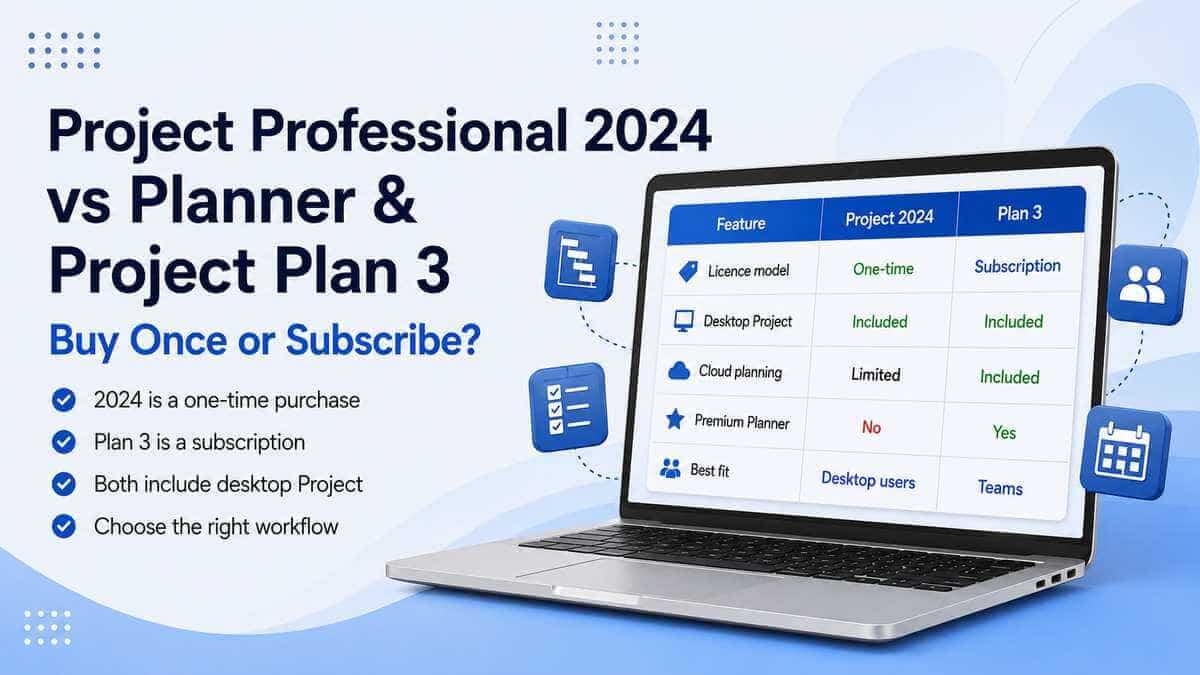
Visio Professional 2024 is aimed at somebody who wants the full professional desktop application but doesn't particularly want another monthly or annual Microsoft subscription.
It's a one-time-purchase desktop product for the licensed PC.
Its professional feature set includes things such as:
- additional templates and shapes;
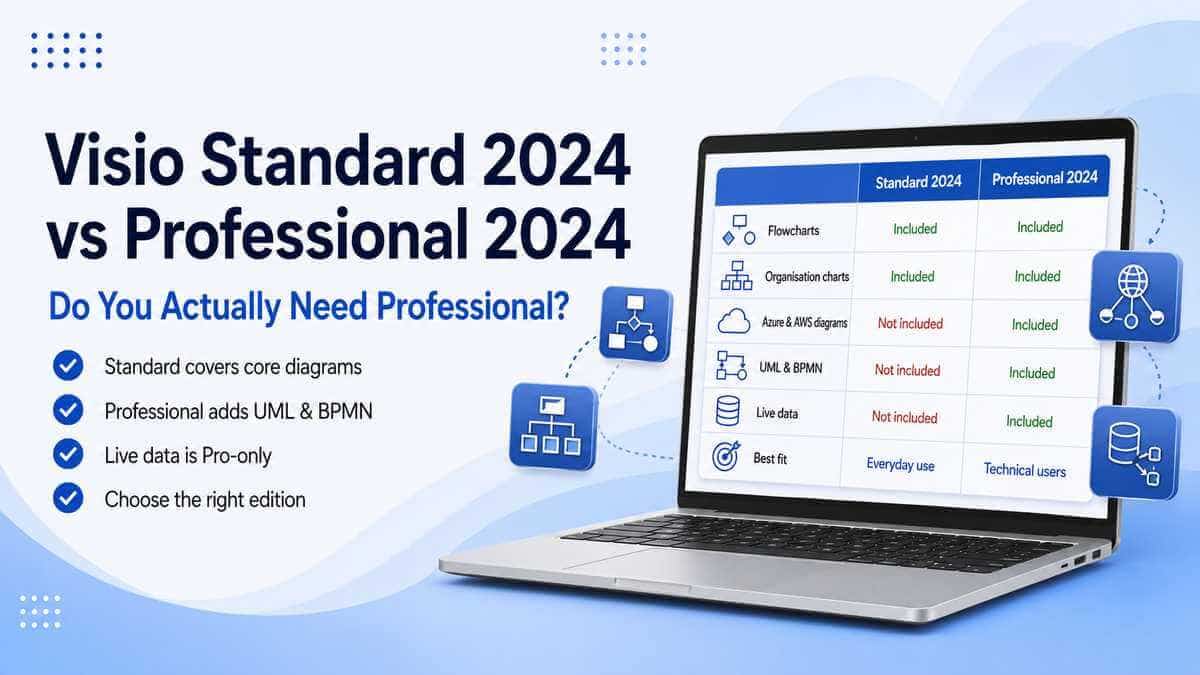
- Azure and AWS cloud architecture diagrams;
- ERD and UML software and database diagrams;
- BPMN;
- engineering and electrical diagrams;
- P&ID diagrams;
- live data connectivity;
- data graphics;
- automatic data refresh.
That's considerably beyond the lightweight Visio experience bundled with Microsoft 365.
It isn't necessarily better for everybody.
It's simply solving a different problem.
If Microsoft 365 already includes some Visio, why buy Professional?
Because "some Visio" may not be the Visio you need.
Imagine somebody who makes an organisation chart twice a year.
They've got an eligible Microsoft 365 business subscription.
For them, the included browser version may be ideal.
Buying Visio Professional would achieve almost nothing except giving them considerably more software than they need.
Now take a network engineer documenting Azure architecture.
Or a software architect working with UML.
Or an engineering business producing electrical and P&ID diagrams.
That's a completely different requirement.
The lightweight Microsoft 365 version isn't suddenly the best choice just because it's already paid for.
The important bit: don't choose based on whether the word "Visio" appears in your Microsoft 365 account. Choose based on the diagrams you actually need to create.
Does Visio Professional 2024 require Microsoft 365?
No.
Visio Professional 2024 is a standalone desktop product.
You don't need a Microsoft 365 subscription simply to use it.
That makes it useful for somebody who already has Office sorted separately and specifically needs Visio.
Likewise, buying Visio Professional doesn't give you Microsoft 365.
You're buying Visio, not an Office or Microsoft 365 bundle.
Can Visio Professional 2024 work alongside Microsoft 365?
Often, yes.
But just as with Project, don't assume compatibility solely because both products have Microsoft written on them.
The existing Office installation can matter.
Things such as installation technology, update channel and whether Office is running 32-bit or 64-bit can affect how another Office-family application is installed alongside it.
If you've already got Microsoft 365 Apps installed and want to add a perpetual Visio 2024 product, check the existing setup first.
It's considerably easier than trying to untangle an installation mismatch afterwards.
Can I use Visio on a Mac?
The traditional Visio desktop application is a Windows product.
Microsoft's browser-based Visio options, however, can be used through a supported browser on a Mac.
So if you're a Mac user and only need browser-based Visio, the web route may actually suit you better.
If you specifically need Visio Professional 2024 desktop, you're looking at a Windows requirement.
What if I only need flowcharts?
Check what you've already got before spending anything.
Basic flowcharts are exactly the sort of diagram the included Microsoft 365 Visio web experience is designed to handle.
If your business already has an eligible Microsoft 365 commercial plan, try that first.
You may discover it does everything you were about to buy another licence for.
Sometimes the right answer genuinely is: use the software you're already paying for.
What about organisation charts?
Again, start with the included version.
Organisation charts fall squarely into the sort of general-purpose diagramming the web experience is intended to handle.
For a straightforward company structure showing teams, managers and reporting lines, the browser app may be perfectly adequate.
The need for Professional starts appearing once you're doing more sophisticated diagramming, advanced data connections or specialised technical work.
What about network diagrams?
This depends on what you mean by "network diagram".
A straightforward network diagram is very different from detailed professional network documentation.
The lighter Visio experiences can cover simpler diagramming.
Visio Professional adds the broader professional templates and shapes required for considerably more technical work, including cloud architecture.
So don't base the decision on the word "network" alone.
Look at the actual diagram you're expected to produce.
Do I need Professional for Azure diagrams?
If detailed Azure or AWS cloud architecture is the reason you're buying Visio, Professional is where I'd start looking.
Those are exactly the sorts of professional diagrams that separate somebody occasionally drawing a business process from somebody using Visio as a technical tool.
What about UML and database diagrams?
Again, that's much more firmly in Professional territory.
Visio Professional 2024 provides professional software and database diagramming capabilities including ERD and UML.
If that's a routine part of your job, the included Microsoft 365 web version probably isn't the comparison that matters.
Your real decision is more likely to be Visio Professional 2024 vs Visio Plan 2.
What about live data?
This is another area where Professional earns its name.
Visio Professional 2024 can connect diagrams to data and display that information through visual data graphics.
That becomes useful when the diagram itself is doing more than simply showing static shapes.
If you're drawing a basic process, none of that may matter.
If the diagram is being used as a visual representation of changing business or technical information, it can matter a great deal.
Which option is best for one person?
It depends entirely on what that one person does.
If somebody occasionally makes flowcharts or organisation charts and already has an eligible Microsoft 365 business subscription, I'd try the included web version first.
If that person needs more browser-based diagramming but doesn't need an installed Windows application, Plan 1 may be enough.
If they need advanced Visio both online and on the desktop and prefer subscription licensing, Plan 2 makes sense.
If what they actually want is:
"Full Visio Professional on my Windows PC, and I want to buy it once."
Then Visio Professional 2024 is the obvious comparison.
Which option is better for a team?
The subscription options become more attractive once collaboration is central to the job.
Visio for the web supports collaboration, making it easier for several people to work around diagrams without passing files backwards and forwards.
Plan 1 and Plan 2 take that browser-based approach further.
A perpetual desktop copy of Visio Professional can still make perfect sense for the person actually creating complex diagrams, but the team's wider workflow matters.
If diagrams need to live in Microsoft 365, be shared through Teams and worked on collaboratively, don't ignore the advantages of the web versions simply because desktop Visio has more features.
So what should you actually use?
Visio in Microsoft 365 may already be enough if:
- You have a qualifying Microsoft 365 commercial or education plan.
- You mainly create basic business diagrams.
- You need flowcharts or organisation charts.
- You prefer working in a browser.
- Collaboration is useful.
- You don't need specialised professional templates.
- You don't need the installed Visio desktop application.
Visio Plan 1 makes more sense if:
- You want more than the included Microsoft 365 version.
- You still prefer browser-based Visio.
- You want additional templates and diagramming capabilities.
- You work across different computers.
- You don't need the Windows desktop application.
Visio Plan 2 makes more sense if:
- You want both web and desktop Visio.
- Collaboration is important.
- You need advanced professional diagramming.
- You prefer subscription licensing.
- You want Microsoft's subscription-based Visio environment.
Visio Professional 2024 makes more sense if:
- You want the full Windows desktop application.
- You prefer buying the software once.
- You need advanced network or cloud architecture diagrams.
- You use UML, ERD, BPMN or engineering diagrams.
- You work with data-connected diagrams.
- You don't need an ongoing Visio subscription.
- You expect to use the same desktop release for several years.
Our take
This is one of the rare Microsoft licensing questions where the answer has actually become better for some users, even if the naming has become more confusing.
Years ago, somebody who needed the occasional flowchart might have assumed they needed to buy Visio.
Today, a lot of Microsoft 365 business users already have enough Visio in their subscription to handle that sort of work.
That's worth checking.
But don't confuse Visio in Microsoft 365 with Visio Professional desktop.
They share a name.
They share some diagramming capability.
They're not the same product.
If all you need is the occasional business diagram, use what you've already got.
If you need a stronger browser-based diagramming tool, look at Plan 1.
If you want cloud collaboration plus Microsoft's full desktop Visio environment, Plan 2 deserves consideration.
And if what you really want is the full professional Windows application on one PC without an ongoing Visio subscription, that's exactly where Visio Professional 2024 fits.
Start with the diagrams you actually need to make.
The right licence normally becomes obvious once you stop choosing based purely on the word "Visio".
Want to compare the two full professional routes? Read our Visio Professional 2024 vs Visio Plan 2 guide.
If you're not sure whether Professional itself is necessary, our Visio Standard 2024 vs Professional 2024 comparison explains what the extra edition actually adds.
You can also browse our Microsoft Project & Visio licences.
Microsoft Visio Professional 2024
Need the full professional Windows desktop application? View the product details, compatibility requirements and licence information.
View Microsoft Visio Professional 2024Frequently asked questions
Is Microsoft Visio free with Microsoft 365?
A lightweight Visio web experience is included with qualifying Microsoft 365 commercial and education plans at no additional cost. This isn't the same as receiving the full Visio desktop application.
Does Microsoft 365 Business Standard include Visio?
Qualifying Microsoft 365 Business Standard commercial subscriptions can include Visio in Microsoft 365 for browser-based diagram creation and editing. They don't automatically include Visio Professional desktop.
Does Microsoft 365 Business Basic include Visio?
Microsoft includes Visio in Microsoft 365 with a range of qualifying commercial subscriptions, including Business Basic. The full desktop application is not included.
Does Microsoft 365 Personal include Visio?
No. Microsoft 365 Personal shouldn't be treated as including the editable Visio in Microsoft 365 experience supplied with qualifying commercial plans.
Does Microsoft 365 Family include Visio?
No. Microsoft 365 Family is a consumer subscription and doesn't include the full Visio desktop application or the same Visio entitlement offered with qualifying commercial plans.
Is Visio in Microsoft 365 the full Visio program?
No. It's a lighter browser-based Visio experience intended primarily for general-purpose diagramming.
Does Visio Plan 1 include the desktop app?
No. Visio Plan 1 is web-based and doesn't include Microsoft's installed Windows desktop application.
Which Visio subscription includes the desktop application?
Visio Plan 2 includes Microsoft's Visio desktop application alongside its web-based Visio capabilities.
Can I buy Visio without a subscription?
Yes. Perpetual desktop editions such as Visio Standard 2024 and Visio Professional 2024 provide a one-time-purchase alternative to Microsoft's Visio subscriptions.
Can I use Visio on a Mac?
Visio for the web can be used through supported browsers on a Mac. The traditional Visio desktop application is designed for Windows.
Can the Microsoft 365 version work with .vsdx files?
Yes. .vsdx is the modern Visio drawing format supported by Microsoft's current Visio environment.
Do I need Visio Professional just to make a flowchart?
Probably not. If you have an eligible Microsoft 365 business subscription, try Visio in Microsoft 365 first. Basic flowcharts are exactly the sort of general-purpose diagram it's designed to handle.
Is Visio Professional 2024 a subscription?
No. Visio Professional 2024 is a perpetual desktop product rather than an ongoing Visio subscription.
What's the main reason to choose Visio Professional 2024?
It makes sense when you need the installed Windows application and advanced capabilities such as cloud architecture, UML, ERD, engineering, BPMN or data-connected diagrams rather than basic browser-based diagramming.