Microsoft 365 Basic Is Active, but Word and Excel Are Read-Only — Here’s Why
By Adam Smart, Ecokeys Support Engineer — Published 30 July 2026
Here’s an email that lands in our inbox regularly, usually with the same slightly betrayed tone: “I’m paying for Microsoft 365 Basic. My subscription says active, so why are Word and Excel read-only?”
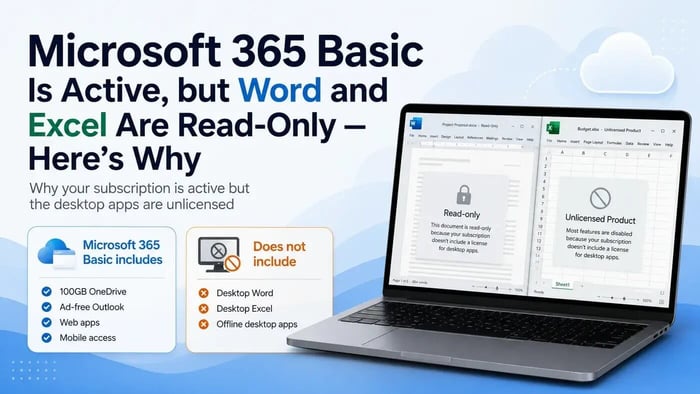
Word may open the document normally, but it will not let the customer type, edit or create a new file. Excel may open a spreadsheet but display Licence not found, Unlicensed Product or restrict the workbook to read-only mode.
Nobody has necessarily broken anything. The payment may have gone through correctly and the Microsoft account may be working normally.
The confusion comes from Microsoft’s product naming. Several different plans carry the Microsoft 365 name while including very different benefits. Microsoft 365 Basic does not include a licence for the full Word and Excel desktop applications.
The short version
Microsoft 365 Basic provides 100GB of OneDrive cloud storage, additional Outlook.com benefits, account protection features and access to Microsoft services on the web and supported mobile devices.
What it does not provide is a licence for the full desktop editions of Word, Excel, PowerPoint and the other Office applications installed on your computer.
These are the programs you open from the Windows Start menu, with the full ribbon, offline access and advanced tools.
Your Microsoft 365 Basic subscription can therefore be genuinely active while desktop Word and Excel remain unlicensed.
Microsoft’s current plan comparison lists Basic as a web, iOS and Android plan centred on OneDrive and Outlook. Full desktop applications are added with eligible plans such as Microsoft 365 Personal. You can compare the current Microsoft 365 plans here.
Why do Word and Excel open if the desktop apps are not licensed?
This is the part that understandably confuses people.
If Word is not licensed, it seems reasonable to expect it to refuse to open completely. Instead, it may open normally, show the document, display the menus and allow you to scroll through the file.
It then quietly refuses to let you change anything.
It is less “access denied” and more like a librarian who is happy to let you look at the book but will not let you take a pen to it.
This happens because an unlicensed Office installation can enter reduced-functionality mode. You may still be able to view and print documents, but editing and creating new files are disabled.
The symptoms often look like this:
- Word opens normally, with the menus and ribbon visible
- Your existing documents are still there and have not necessarily been damaged
- Editing buttons are unavailable or do not respond
- You cannot create or save a new document
- Excel may report Licence not found or open spreadsheets in read-only mode
- PowerPoint may allow you to view a presentation but not edit it
- Office displays Unlicensed Product or Activation Required
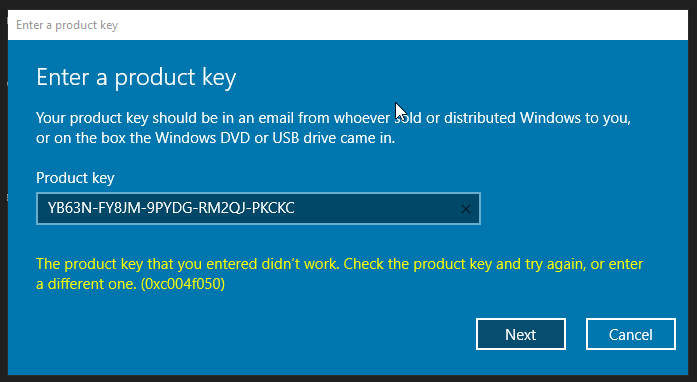
- Microsoft asks you to subscribe or enter a product key
Microsoft confirms that an unlicensed desktop installation can continue opening and printing documents while editing and creating new files remain unavailable.
How to confirm why Word or Excel is read-only
Before doing anything drastic, such as uninstalling Office, buying another licence or repeatedly entering product keys, spend a few minutes confirming the cause.
Step 1: Check which Microsoft 365 plan you actually have
Sign in to your Microsoft account using the email address used to purchase the subscription.
Open the Services & subscriptions section and look for the exact product name.
It may show:
- Microsoft 365 Basic
- Microsoft 365 Personal
- Microsoft 365 Family
- Microsoft 365 supplied by an employer or school
- Office Home 2024
- Office Home & Business 2024
- another standalone Office product
If the account shows Microsoft 365 Basic, that explains why the installed desktop Word and Excel applications are not activated.
If it shows Personal, Family or a standalone Office purchase, you may have an activation or account problem instead. In that situation, it is worth troubleshooting the existing licence before purchasing anything else.
Step 2: Check what Word or Excel believes is installed
Open Word or Excel and go to:
File > Account
Check:
- the product name displayed
- whether it says Unlicensed Product
- the email address currently signed in
- whether more than one account is listed
- whether an old work or school account is still connected
It is common for Office to be signed into the wrong Microsoft account.
You may have:
- a personal Outlook or Hotmail account
- a work Microsoft 365 account
- an old school or university login
- a Microsoft account created using a Gmail address
- an account previously used on another computer
If another account owns Microsoft 365 Personal, Family or a standalone Office licence, signing into the correct account may resolve the problem.
Signing out and back into the same Microsoft 365 Basic account will not add desktop applications to the plan.
Step 3: Check whether every document is affected
Not every read-only Word document or Excel spreadsheet is caused by Microsoft 365 Basic.
A single file can also open read-only because:
- it was downloaded from the internet and opened in Protected View
- Windows has marked the file as read-only
- another person currently has the shared file open
- the document owner has restricted editing
- you do not have permission to save into the folder
- the file is being opened from an email attachment
- a network or cloud folder has restricted access
Try creating a new blank Word document or Excel spreadsheet.
If every document is affected, Office displays Unlicensed Product and your account only contains Microsoft 365 Basic, the licence is likely to be the cause.
If other documents edit normally and only one file is affected, purchasing another Office licence is unlikely to fix it.
Step 4: Check for multiple Office installations
Your computer may contain more than one Office edition, including:
- an expired Microsoft 365 trial
- an older Office 2019 or Office 2021 installation
- Microsoft 365 applications installed by a previous employer
- a newly installed Office edition alongside an older version
- part of a previous Office installation that was not removed correctly
Conflicting installations can cause the wrong Office edition to open or prevent a valid licence from being recognised.
Removing old or conflicting versions can help when you already own a valid desktop Office licence.
However, uninstalling and reinstalling Office will not make Microsoft 365 Basic include desktop Word and Excel. It cannot change the benefits of the plan.
The important point
If your account genuinely contains Microsoft 365 Basic and you need the installed desktop versions of Word and Excel, repairing Office or repeatedly signing in will not add those applications to the Basic plan.
You must choose one of the following:
- use Word and Excel through a web browser
- upgrade to a Microsoft 365 plan that includes desktop applications
- purchase a compatible standalone Office licence
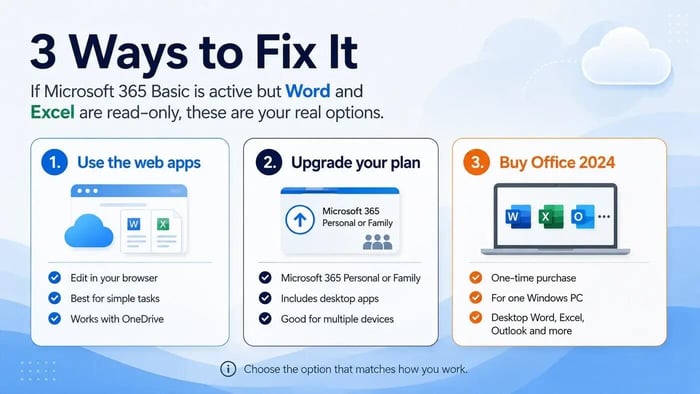
Three legitimate ways to solve the problem
Once you have confirmed that Microsoft 365 Basic is the cause, there are three honest options.
The right choice depends on how you work, how many devices you use and whether you prefer a subscription or a one-time purchase.
Option 1: Continue using Word and Excel in your browser
If your documents already live in OneDrive, your needs are fairly straightforward and you are normally online, Word and Excel for the web may cover everything you need without paying for another Office product.
The browser versions can be used for tasks such as:
- creating and editing standard documents
- working with straightforward spreadsheets
- saving files to OneDrive
- sharing documents with other people
- opening files from different computers
- basic collaboration
They may be less suitable when you rely on:
- advanced Excel functions or complex workbooks
- macros
- large or heavily formatted documents
- advanced mail merge
- desktop Outlook
- Access databases
- working for long periods without an internet connection
Microsoft provides further guidance on using Microsoft 365 applications through a browser.
Option 2: Upgrade to Microsoft 365 Personal or Family
Microsoft 365 Personal includes the full desktop versions of Word, Excel, PowerPoint, Outlook and OneNote, together with additional cloud storage and multi-device access.
Microsoft 365 Family provides similar subscription benefits for several people, subject to Microsoft’s current plan conditions.
A Microsoft 365 subscription may be the better choice when you need:
- Office on several computers or mobile devices
- applications for both Windows and Mac
- 1TB of OneDrive storage
- ongoing feature updates
- multi-device working
- family sharing
- subscription-based Microsoft services
The main trade-off is the ongoing monthly or annual subscription charge.
Option 3: Buy a standalone Office licence
If you have one main Windows PC and would rather pay once than add another recurring Office subscription, a standalone Office licence may be more suitable.
Office 2024 Professional Plus provides the desktop versions of:
- Word 2024
- Excel 2024
- PowerPoint 2024
- Outlook 2024
- Access 2024
- OneNote 2024
It is a one-time purchase for one compatible Windows PC.
It does not replace the separate OneDrive storage, Outlook.com mailbox benefits or account protections included with Microsoft 365 Basic. Instead, it provides the desktop Office licence that the Basic plan does not include.
This option may be suitable if:
- you use one main Windows computer
- you want the full desktop versions of Word and Excel
- you need Outlook or Access
- you do not require Office across several devices
- you already have enough cloud storage
- you prefer a one-time payment to a recurring Office subscription
It is not suitable for a Mac, Chromebook, iPad, Android tablet or Linux computer.
Microsoft describes Office 2024 products as one-time purchases containing classic desktop applications, without the additional subscription services included with Microsoft 365.
Need the full desktop Office applications on one Windows PC?
Review the included applications, compatibility information and installation method before purchasing.
Will buying Office 2024 automatically fix read-only Word and Excel?
Only when the underlying problem is the absence of a valid desktop Office licence.
A new Office licence will not fix:
- a damaged document
- Protected View
- restricted file permissions
- a locked shared document
- an unsupported operating system
- a network-folder permissions problem
- a general fault with the computer
Before purchasing, confirm that:
- Your Microsoft account contains Basic rather than Personal or Family.
- You need the installed desktop applications rather than the browser versions.
- Your device runs a compatible version of Windows.
- You are selecting the correct Office product and edition.
- Old or conflicting Office installations can be removed.
Do you need to cancel Microsoft 365 Basic after installing Office 2024?
Not necessarily.
Microsoft 365 Basic and standalone Office 2024 provide different benefits.
You may still want to keep Microsoft 365 Basic for:
- 100GB of OneDrive cloud storage
- additional Outlook.com email benefits
- OneDrive ransomware protection
- cloud file recovery features
- Microsoft account support
Standalone Office 2024 provides the installed desktop applications, but it does not add a OneDrive subscription or replace your Microsoft 365 Basic storage allowance.
Some people therefore keep Microsoft 365 Basic for cloud storage and email while using a one-time Office licence for desktop Word, Excel and the other included applications.
Before cancelling Basic, check how much OneDrive storage you are currently using. Returning to a free account with a smaller allowance could create a separate storage problem if your account is over the free limit.
Quick questions
Why does Microsoft say my subscription is active if Word will not work?
Because the subscription is active for the services Microsoft 365 Basic includes. Desktop Word is not included, so the subscription can be active while the installed application remains unlicensed.
Does Microsoft 365 Basic include desktop Word and Excel?
No. Microsoft 365 Basic is focused on web and mobile access, OneDrive storage, Outlook.com benefits and account protection. It does not include a desktop licence for the full Word and Excel applications.
Why is Excel read-only when Microsoft 365 Basic is paid for?
The desktop Excel application may be running in reduced-functionality mode because it cannot find an eligible desktop licence. Check your Microsoft plan and then open File > Account in Excel to confirm the product and signed-in account.
Will repairing Office fix this?
No. A repair may correct damaged program files or some genuine activation faults, but it cannot add desktop applications to a subscription that does not include them.
Will signing out and back in help?
Only if you sign into another Microsoft account that owns a desktop-eligible Microsoft 365 plan or standalone Office licence. Signing back into the same Microsoft 365 Basic account will not change the plan.
Can I still open my existing documents with standalone Office?
Standard Word documents, Excel spreadsheets and PowerPoint presentations can normally be opened in the corresponding Office 2024 applications.
Keep a backup of important files before uninstalling or changing software, as a normal precaution.
Can I keep Microsoft 365 Basic and install Office 2024?
Yes. They provide different benefits. Basic can continue providing its cloud-storage and Outlook.com services, while Office 2024 provides the desktop applications on the licensed Windows PC.
Does Office 2024 include OneDrive storage?
No additional OneDrive storage is included with the standalone Office 2024 licence. Any OneDrive allowance comes from your existing Microsoft account or Microsoft 365 subscription.
Can I install this Office 2024 product on a Mac?
No. The linked Office 2024 Professional Plus product is intended for a compatible Windows PC. Mac users should select a product specifically described as compatible with macOS.
Microsoft 365 Basic is not broken — it is a different type of plan
If Microsoft 365 Basic is active but Word and Excel are read-only, the first step is to confirm the exact subscription and the account shown under File > Account.
Basic provides useful cloud, email, browser and mobile benefits, but it does not activate the full Word and Excel desktop applications.
You can continue using the browser applications, upgrade to a Microsoft 365 plan that includes desktop apps or choose a standalone Office licence for one compatible Windows PC.
The right option depends on whether you need multi-device subscription benefits or simply want the full desktop programs on your main computer.
Checking the exact plan before repairing, uninstalling or purchasing anything will help you avoid wasting time on fixes that cannot change what Microsoft 365 Basic includes.