Office 2024 32-bit or 64-bit? Which Should You Install
By Adam Smart, Ecokeys Support Engineer — 25 July 2026
If you've just bought Office 2024 and the installer hasn't asked you this question yet, it's about to make the choice for you: 64-bit, by default, every time, unless you tell it otherwise. For most people that's exactly the right outcome. For a smaller group — usually businesses running older add-ins or specialist software — it's the start of a genuinely frustrating afternoon. Here's how to know which camp you're in before you install anything.
What's actually different between them?
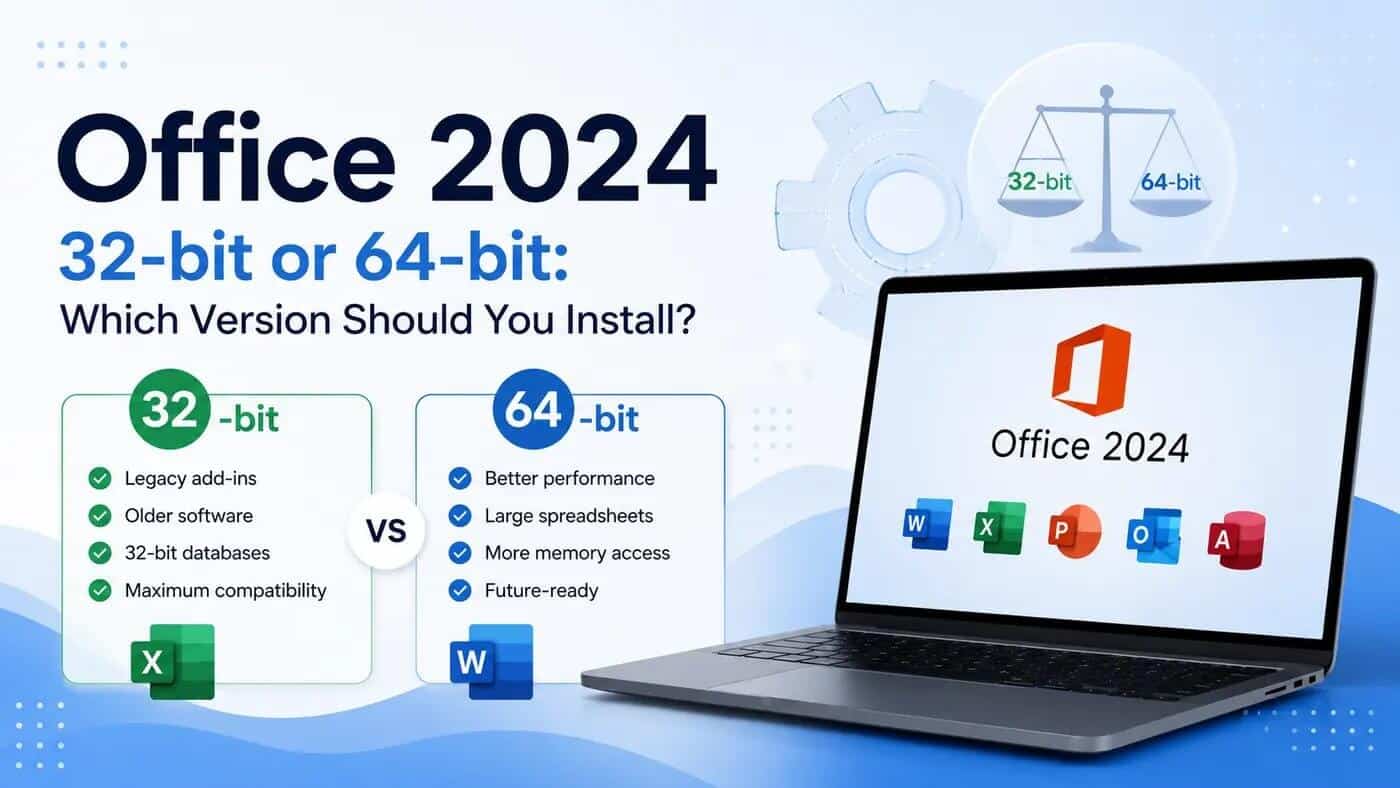
Without getting into processor architecture: 64-bit Office can handle more memory, which matters for very large spreadsheets, complex data models and heavy Access databases. 32-bit Office is the older standard that some legacy add-ins, older Access files, and specialist business software were built specifically for — and in a lot of cases, only work with. The applications themselves — Word, Excel, PowerPoint, Outlook — look and behave identically either way. The difference only shows up when something else on your PC needs to talk to Office directly.
The quick answer, if you just want to know
For a normal home computer, a new small-business setup, or anyone who doesn't rely on older add-ins or specialist Excel/Outlook-linked software: install 64-bit. It's Microsoft's default for good reason, and it's the right call for the large majority of people reading this.
Keep reading if any of the following apply, because getting this wrong means a full uninstall and reinstall to fix it.
When 64-bit is the better choice
64-bit Office 2024 makes sense if you regularly work with very large Excel workbooks, big datasets, Power Pivot, complex pivot tables, external database connections, or large images and video inside PowerPoint. It's also the straightforward choice if this is a fresh install with no existing Office-linked software already on the machine — which describes most home and new-business setups.
When you should still install 32-bit
This is the part worth genuinely checking before you install, not after. Install 32-bit Office 2024 if you rely on any of the following:
- An older Office add-in that was never updated for 64-bit
- Specialist software that plugs directly into Excel or Outlook — accounting packages, CRM systems, label-printing tools and similar are common culprits
- An older Access database compiled as a 32-bit MDE or ACCDE file
- 32-bit ActiveX controls or older VBA code using Windows API declarations that don't carry over to 64-bit
- A database driver that's only available in 32-bit form
None of this is theoretical — it's a live problem people are running into right now. Office 2024 Pro Plus installs as 64-bit automatically, and support forums have genuine, recent cases of users discovering only after installing that a program they depend on works exclusively with 32-bit Excel.
Does having 64-bit Windows mean you need 64-bit Office?
No — this is one of the more common misunderstandings. Windows being 64-bit doesn't force your hand on Office. A 64-bit Windows 11 PC can run either the 32-bit or 64-bit edition of Office 2024 perfectly well. The decision should come down to what your add-ins and specialist software actually require, not what type of Windows installation you have.
The 60-second decision check
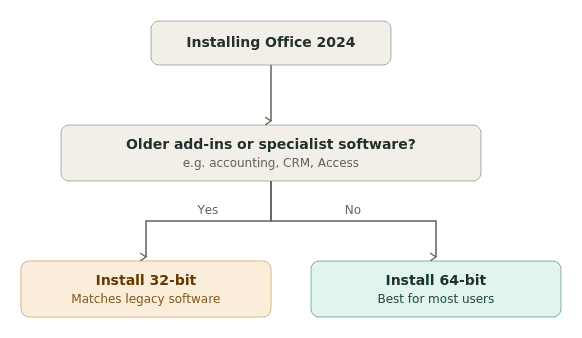
Go with 64-bit if: this is a normal home or new-business computer, you don't use older Office add-ins, you don't rely on specialist Excel-linked software, you work with large spreadsheets or databases, and any other Office applications already on the PC (Project, Visio) are also 64-bit.
Go with 32-bit if: an essential add-in specifically requires 32-bit Office, your accounting, CRM, label-printing or database software specifies 32-bit Excel or Outlook, you're using an older Access database or a compiled MDE/ACCDE file, your IT provider has told you to stay on 32-bit, or your existing Visio/Project installation is 32-bit.
Stop and check before installing if: you're not sure whether a business-critical add-in is 32-bit, the computer already has Project, Visio or another Office application installed, an old Access database is central to how the business runs, or the software vendor has given you a specific compatibility requirement. A five-minute call to whoever supports that software is a lot less hassle than reinstalling Office afterwards.
How to check whether your current Office is 32-bit or 64-bit
Open Word or Excel, click File, then Account, and select About Word (or About Excel). The version number shown at the top will state 32-bit or 64-bit directly.
Microsoft Office 2024 Standard Licence Key – 1 Windows PC
£15.99
Microsoft Office 2024 Standard Licence Key for 1 Windows PC Buy a Microsoft Office 2024 Standard licence for one compatible Windows PC. This genuine Office… read more
Programs worth checking before you install or switch
If any of these are in use, it's worth confirming their Office bit-version requirement first: Microsoft Project, Microsoft Visio, Sage or other accounting integrations, CRM add-ins that plug into Outlook, label-printing software, Access databases, Excel plugins, and document-management systems. Not all of these require 32-bit specifically — check with the software provider rather than assuming either way.
Why does it say "Office (64-bit or 32-bit) couldn't be installed"?
This happens because Windows won't allow 32-bit and 64-bit Office components to coexist. If you're seeing this error, an existing installation — Office itself, or a standalone app like Project or Visio — is already on the machine in the other architecture. To fix it: uninstall the conflicting version completely first, then install whichever architecture you actually need.
Can you switch from 32-bit to 64-bit later on?
Yes, but not as an in-place upgrade — Microsoft doesn't support directly converting one to the other. You'll need to uninstall the version you have, then install the other from your Microsoft account. Your documents and files aren't affected by this; only the Office program itself needs reinstalling.
Does this depend on Office 2024 Standard or Professional Plus?
No — both editions can be installed as either 32-bit or 64-bit. The edition determines which applications you get (Professional Plus adds Access, among others); the architecture is a separate choice about compatibility and memory handling, and applies the same way regardless of which edition you're installing.
Once you've worked out which architecture fits your setup, choosing between editions is the more straightforward part. You can compare Microsoft Office 2024 keys & licences before deciding which option best suits your PC and requirements. Office 2024 Standard covers Word, Excel, PowerPoint and Outlook for most home and small-business needs, while Office 2024 Professional Plus adds Access and the full application set where that's specifically needed. Both come with installation instructions for either architecture. If your business relies on older Excel add-ins, Access databases or specialist software, it's worth confirming the required Office architecture with that software's provider before buying — that one check avoids almost every problem covered above.
Frequently asked questions
Is Office 2024 64-bit by default?
Yes, unless you specifically select 32-bit before installing, or the installer detects an existing 32-bit installation already on the machine.
Can I install 32-bit Office on 64-bit Windows 11?
Yes. Windows being 64-bit doesn't restrict which Office architecture you can install.
Is 64-bit Office faster than 32-bit?
Not in everyday use for most people — the practical difference shows up in memory-heavy tasks like very large spreadsheets or complex data models, where 64-bit has a genuine advantage.
Does 64-bit Office work with old Excel add-ins?
Only if the add-in was specifically built or updated for 64-bit. Many older add-ins were written for 32-bit only and won't load in 64-bit Office.
Which version is better for large Excel spreadsheets?
64-bit, since it can access more memory for large datasets, Power Pivot and complex calculations.
Can 32-bit and 64-bit Office be installed on the same PC?
No — Windows doesn't allow them to coexist. Installing one requires uninstalling the other first if it's already present.
Do Project and Visio need to match the Office bit version?
Yes — all Office applications on the same PC, including Project and Visio, need to be the same architecture.
Will switching from 32-bit to 64-bit delete my documents?
No — your files are stored separately from the Office program and aren't affected by uninstalling and reinstalling Office itself.
How do I check whether my current Office is 32-bit or 64-bit?
File > Account > About Word (or About Excel) shows this at the top of the version details.