Office 2024 Professional Plus vs Standard: What’s the Difference?
By Adam Smart, Ecokeys Support Engineer — 24 August 2026
Professional Plus and Standard. Two names that sound like they should be describing wildly different products, and then you look at the application list and Word's there in both, Excel's there in both, and you start to wonder if "Professional Plus" is just marketing dressing on the same thing. Fair question.
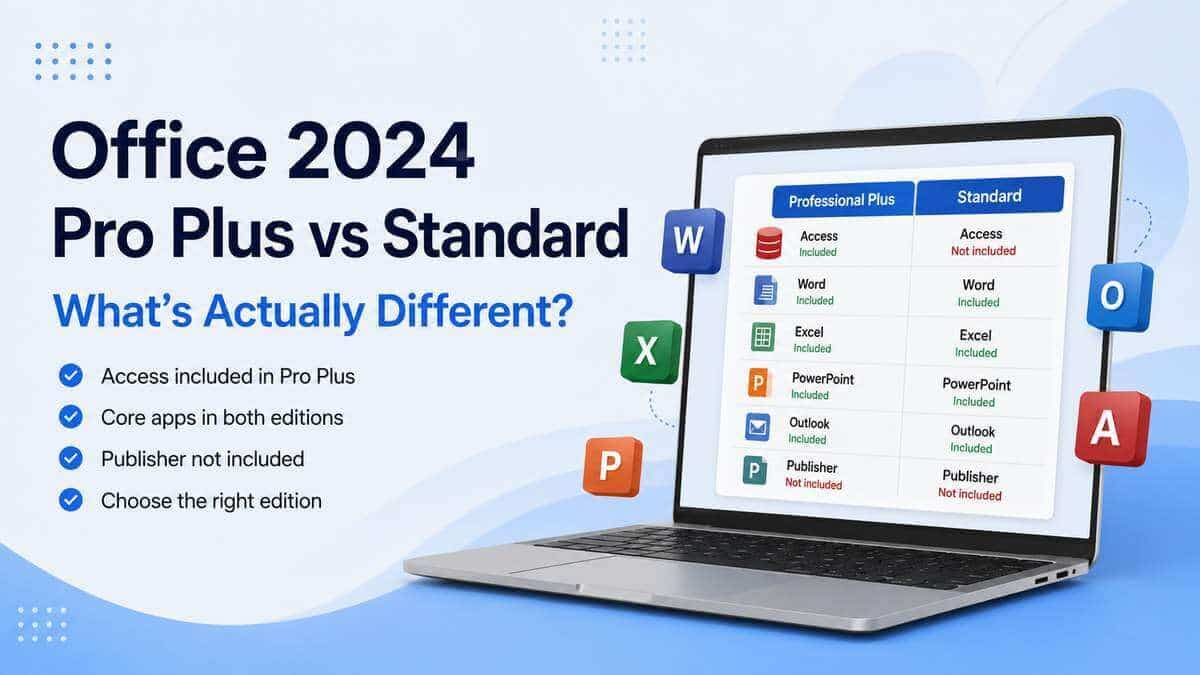
The key application difference is Microsoft Access. Professional Plus includes it. Standard doesn't. For most people deciding between these two Office 2024 editions, that's the difference that matters most.
If you're deciding which edition to buy, you can compare Microsoft Office 2024 editions to view Professional Plus, Standard and other available Office 2024 options.
Quick answer
Everything included, side by side
Word, Excel, PowerPoint, Outlook and OneNote are included in both editions, so there's no difference there. Microsoft Access is included with Professional Plus but not Standard.
Neither edition includes Publisher, Project or Visio. That's worth knowing, because "Professional Plus" can sound as though it means every Microsoft desktop application is included, and that isn't the case.
Why Access is the big difference here
Access isn't a fancier Excel. It's a genuinely different kind of tool — a relational database application built for structured, connected information rather than rows and columns you're working through on a spreadsheet.
If your business runs a customer database, tracks stock through Access forms, generates reports from stored records, or has inherited an old ACCDB or MDB file that something important depends on, none of that simply transfers across to Excel because Access isn't installed.
This is exactly the kind of thing that can trip people up when replacing an older PC. Word and Excel look present and correct in the new Office installation, everything seems fine — and then a few weeks later someone goes looking for the customer database and discovers that the Office edition installed never included Access.
Already using Access? Don't assume it's included
When Professional Plus is the right call
Professional Plus makes sense for business users working with databases alongside the usual documents and spreadsheets, anyone replacing an older Professional Plus installation who wants to retain the broader application set, people with existing Access databases that need to stay usable, and organisations running Access-based forms or internal reporting tools.
It's also the more complete choice if you'd rather have the wider Office 2024 application set available than discover later that a required application wasn't included.
Worth repeating plainly: Professional Plus doesn't mean a better Word or a beefed-up Excel. Both editions contain the same versions of the applications they share. The main reason to choose Professional Plus is that it gives you the broader application set by adding Microsoft Access.
When might Microsoft Access not be required?
If you already know your work only requires Word, Excel, PowerPoint, Outlook and OneNote, and there is no requirement for Microsoft Access, then the additional database application may simply not be relevant to that particular computer.
Where there's any doubt at all — you're replacing an existing Professional Plus machine, supporting a business system you didn't set up yourself, or there's a chance of encountering older database files — it's worth taking two minutes to check for an Access requirement before choosing an edition.
Does either edition include Publisher?
No. Publisher is not included with either Office LTSC Standard 2024 or Office LTSC Professional Plus 2024.
This is worth being precise about because some older Office suites did include Publisher, and Microsoft is separately retiring the Publisher application. Support for Publisher ends in October 2026.
If you're moving from an older Office installation where Publisher is still part of your workflow, it's worth planning for that change before replacing the software. Microsoft recommends preparing important Publisher files for the future, including converting them to formats such as PDF where appropriate.
What about Project or Visio?
Also no, in both editions.
"Professional Plus" is a slightly misleading name if you read it as "the one with everything." In this comparison, it gives you the Standard application set plus Access; it doesn't mean every Microsoft desktop application is included under one roof.
Microsoft Project and Microsoft Visio are separate products. If either is genuinely required, check that the particular product or bundle you're considering explicitly includes it rather than assuming it comes with Office Professional Plus.
Is this the same thing as Microsoft 365?
No, and the distinction matters more than it might seem.
The Professional Plus and Standard editions discussed here are Office LTSC 2024 editions. They are fixed Office releases rather than Microsoft 365 subscriptions. They receive the applicable security and quality updates during their supported lifecycle, but they don't receive the continuing stream of new cloud-linked features supplied to Microsoft 365 subscribers.
Microsoft 365 is the subscription model and, depending on the plan, can include cloud storage, use across multiple devices, continuing feature additions and qualifying Copilot functionality.
If you're deciding between perpetual Office generations rather than between perpetual Office and a subscription, our Office 2024 vs Office 2021 comparison covers that specific decision.
Replacing an older PC? Check what's actually installed first
Don't pick a replacement edition purely by glancing at Word and Excel. Check the Start menu on the machine you're replacing for anything else that's being used, particularly:
- Microsoft Access;
- Microsoft Project;
- Microsoft Visio;
- Microsoft Publisher.
Spotting one of these applications doesn't mean it will automatically be included with every Office 2024 edition. In Access's case specifically, its presence is the key application difference between Standard and Professional Plus.
Professional Plus or Standard for a business?
This comes down to what's actually in use, not how big the business is.
A small company can be entirely dependent on a single Access database, while a much larger organisation might run nothing beyond Word, Excel, PowerPoint and Outlook on a particular computer.
Professional Plus becomes the clear choice wherever database functionality is genuinely part of the job — an existing customer database, an Access-based stock system, internal forms or reports, legacy files that still need opening, or staff who build and maintain Access databases themselves.
Check what's actually being used before assuming the answer from company size alone.
So which one should you actually choose?
If Access is required, has been mentioned by whoever supports your systems, or you're replacing a Professional Plus installation and want to retain the broader application set, Office 2024 Professional Plus is the edition to choose.
If you're unsure, check what's currently installed and what your existing files or business systems actually use before selecting an edition. It's much easier to confirm that now than to discover later that a required application is missing.
If Professional Plus is the right edition for your Windows PC, view the Ecokeys Office 2024 Professional Plus product page for the included applications, compatibility information and licence details.
View Office 2024 Professional PlusFrequently asked questions
What's the main difference between Professional Plus and Standard?
Microsoft Access is the key application difference. Professional Plus includes Access alongside Word, Excel, PowerPoint, Outlook and OneNote. Standard contains the same shared applications but does not include Access.
Does Professional Plus include a better version of Word or Excel?
No. Both editions contain the same versions of the applications they share. Professional Plus provides the wider application set by including Microsoft Access.
Does either edition include Publisher?
No. Publisher is not included with Office LTSC Standard 2024 or Office LTSC Professional Plus 2024. Separately, Microsoft is retiring Publisher, with support ending in October 2026.
Does Professional Plus include Project or Visio?
No. Project and Visio are separate Microsoft products and are only included where a specific product bundle explicitly says so.
I'm not sure whether I use Access — how do I check?
Look for Microsoft Access in your current computer's Start menu and check whether you work with database files ending in .accdb or .mdb. If a business system you rely on is built around Access, confirm that requirement before choosing a replacement Office edition.
```